Gemini Not Available in Your Region? Causes and Static Residential IP Solutions



Clean IP picks: Static IPs from $1.5 each, Dynamic IPs from $0.5/GB


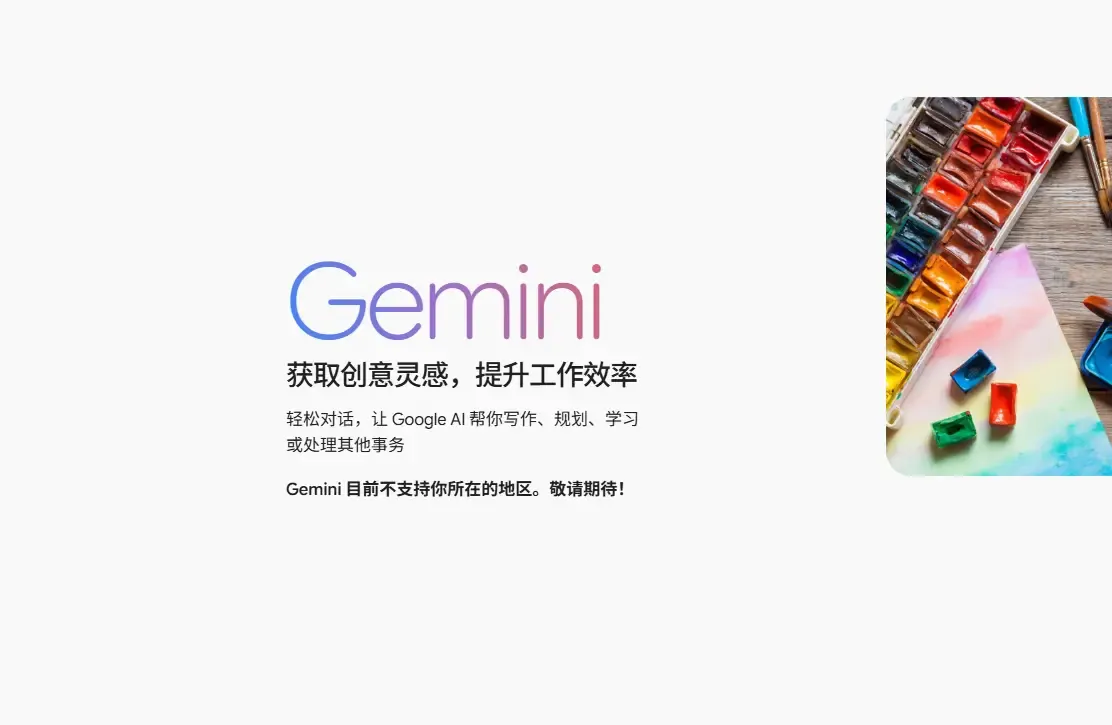
You open Gemini, the page loads fine, and then a message pops up saying Gemini isn't available in your current region. The input box is unusable, and refreshing the page changes nothing. Switching browsers, clearing the cache, even restarting the router may leave the problem exactly where it was.
Before you go shopping for a new device, take a step back. Access to Gemini depends on regional coverage, account eligibility, and your network environment. When the IP attached to your network exit doesn't match where you actually are, that alone can keep the service from working.
1. Why does Gemini say it's unavailable in your region?
Google has explicit rules about where Gemini is offered, and the features available to you can vary by country and region. The web version, the mobile app, and certain advanced features don't necessarily share the same coverage.
So when the region message appears, start with Google's official list of supported countries for Gemini and confirm whether your location is covered at all.
If your location is covered and the page still won't work, the next thing to examine is your network exit.
When you visit Gemini, Google can derive location information from the IP address the request originates from. IP geolocation isn't always accurate, though. Some networks route traffic through a centralized exit, so the country or city tied to the IP may not be where the user actually is.
One caveat worth stating plainly: Google hasn't fully disclosed whether IP type, DNS, or browser settings play a direct role in judging regional availability for Gemini. You shouldn't pin the cause on a single test result.
2. Separate regional restrictions from account problems first
Gemini not opening doesn't automatically mean your IP is the culprit. If you can't sign in to your Google account at all, or sign-in keeps demanding identity verification, check the account status, the verification method, and which devices are signed in before anything else.
If the Google account works normally and the Gemini page loads, with the region message only appearing once you reach the feature interface, then regional coverage and your current network location are the things to verify.
There's another scenario that's easy to overlook: the same account can use Gemini in a desktop browser while the mobile app says it's unavailable. That may come down to differences in regional coverage between products, app distribution, or account eligibility. It isn't grounds for calling it a network fault. Sort these cases out first, and you won't keep repeating checks that were never going to lead anywhere.
3. Start with the IP address when inspecting your network environment
Once you've confirmed your region supports Gemini, look at what your current network exit actually reports.
The IPDEEP IP lookup tool shows the country, city, ISP, and network type behind an IP address. What matters most is whether the result matches the network you're actually on.
If you're using a local connection in one region but the IP lookup places you in another country, it's worth verifying how your network exit is configured.
If the IP location checks out, move on to whether DNS resolution is working, whether the browser carries any unusual network settings, and whether other Google services load normally.
Browser language and timezone work as secondary checks, but there's no need to change your device settings just to match an IP. A WebRTC check mainly reveals which network addresses your browser might expose; it doesn't prove that it's the reason for Gemini's region message.
A useful habit: adjust one setting at a time and record the result before and after. That beats changing several configurations at once, and it makes the real problem far easier to isolate.
4. What can a static residential IP actually solve?
The main advantage of a static residential IP is a relatively fixed address and a stable network exit, which suits situations where you need to keep the same network environment over time. Compared with dynamic or datacenter IPs, the three types differ in a few important ways.
| Aspect | Dynamic residential IP | Datacenter IP | Static residential IP |
|---|---|---|---|
| IP address | May change periodically | Usually can be fixed | Relatively fixed |
| Network source | Residential broadband | Cloud servers or data centers | Residential network resources |
| Geolocation | May shift as the address changes | Depends on server location | Generally stays consistent |
| Network consistency | Affected by address changes | Depends on line configuration | Easy to keep consistent long term |
| Typical use | Everyday network access | Cloud services and server workloads | Long-term fixed network exit needs |
For Gemini users, when the problem is tied to a frequently changing exit or odd IP ownership details, a stable network line takes some of the guesswork out of troubleshooting.
IPDEEP offers static residential IP services. You can choose a plan by region, ISP, and line requirements, then verify the actual address details with the IP lookup tool.
Keep this in mind: a static residential IP mainly improves the stability of your network environment. It does not guarantee a fix for Gemini's region-unavailable message. Whether you can use Gemini still comes down to Google's official coverage and your account eligibility.
5. What if Gemini is still unavailable after switching networks?
If you've already changed your network and Gemini still reports the region as unavailable, go back over a few points that are easy to miss.
First, confirm that the new network's IP location is accurate and that your region falls within the supported coverage for that specific Gemini product. Next, try reaching Gemini with a clean browser profile to rule out interference from old cookies, extensions, or browser settings.
If other Google services work fine on the same network and only Gemini shows the message, look at the account age requirement, the account type, and eligibility for the relevant service.
On mobile, pay attention to the difference between Wi-Fi and cellular data. The two connections may use different network exits, so the detected IP location can differ. Stick to one of them while troubleshooting so the results stay comparable.
If all of the above checks out and you still can't identify the cause, read the relevant documentation in Gemini's help center instead of cycling through more lines.
6. What to watch for when using a static residential IP
When choosing a line, don't just ask whether the IP is fixed. Confirm that the address ownership details are accurate, that the connection is stable, and that the provider clearly explains the line type and terms of use.
Also, a fixed IP doesn't mean it will never change. Carrier maintenance and line adjustments can still affect address assignment, depending on the plan you're on.
If you need a stable network exit over the long term, check the IP address, ISP information, and connection status at regular intervals. When something looks off, confirm whether the network changed before deciding whether your configuration needs adjusting.
FAQ
Q1: Does "Gemini unavailable in your region" mean my Google account has been restricted?
Not necessarily. Regional unavailability and sign-in problems are two different things. Check Google's official supported regions first, then look at account eligibility and your network environment.
Q2: What's the difference between a regular static IP and a static residential IP?
A static IP emphasizes a fixed address. A static residential IP emphasizes both a relatively fixed address and the residential nature of the network resources. They aren't the same thing, so go by the actual line details.
Q3: Will Gemini definitely open once I use a static residential IP?
No guarantee. Access to Gemini still depends on Google's regional availability policy, account eligibility, and service status. A stable IP only helps reduce the uncertainty that comes from a changing network exit.
Final thoughts
When Gemini says it isn't available in your current region, the priority is figuring out where the problem actually sits. Confirming official coverage and account eligibility, then checking IP location, network connectivity, and browser environment, is usually more effective than clearing caches on repeat or switching lines at random.
If the issue really does trace back to an unstable network exit, an IPDEEP static residential IP is one way to keep a consistent network environment over time. Find the cause first, then choose the network setup. That's what keeps troubleshooting costs down.