What is a Proxy Address? How to Find It?



Clean IP picks: Static IPs from $1.5 each, Dynamic IPs from $0.5/GB


In today's digital survival, whether for enhancing network security, protecting personal privacy, or for cross-border e-commerce operations and academic research, Proxy is an unavoidable topic. But for many beginners, what exactly is a proxy address? How does it work? And where can it be found?
What is a Proxy Address?
In simple terms, a proxy address is the IP address of a server that acts as an "intermediary".
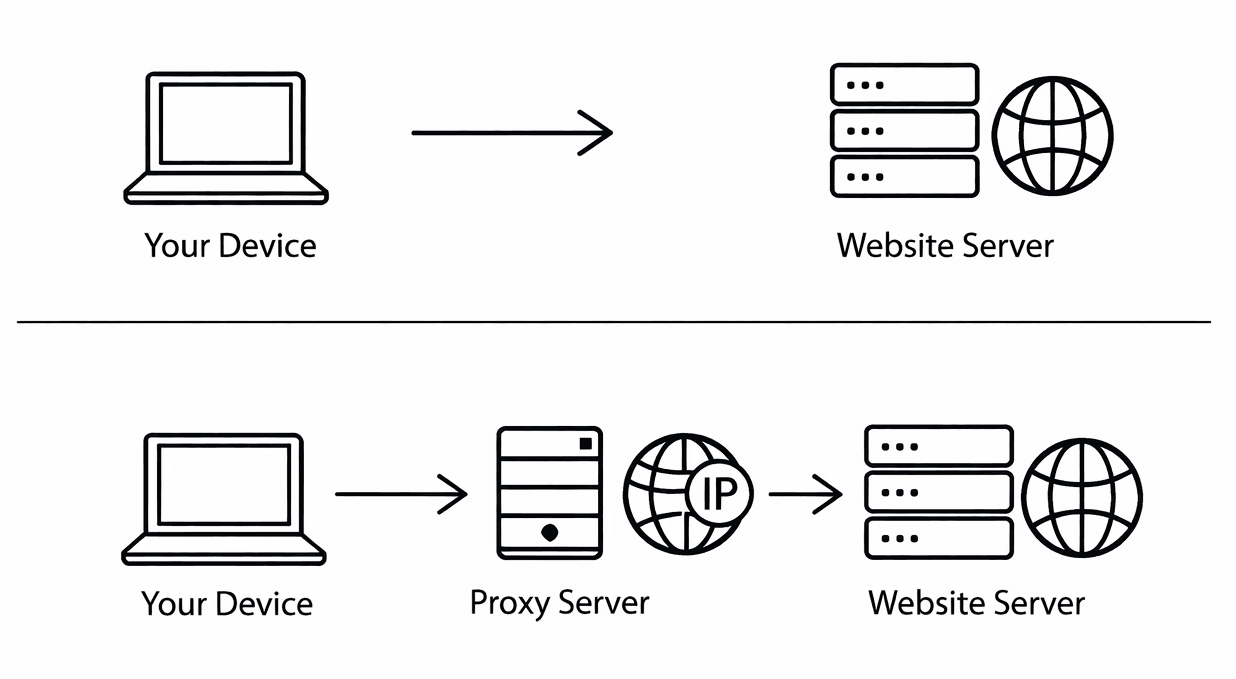
In a typical network access model, your device (phone or computer) sends requests directly to the target website. At this point, the target website can clearly see your real IP address, geographical location, and even service provider information.
When you use a proxy server, the access path changes to:
Your device → Proxy server → Target website
1. Core Components
A complete proxy configuration typically includes two key pieces of information:
· IP Address: Similar to 192.168.1.1 or 45.122.x.x.
· Port Number: A specific channel opened by the proxy server, commonly like 80, 8080, 1080, 443, etc.
2. Why Use a Proxy Address?
Privacy Protection: Hide your real IP address to prevent being tracked.
Bypass Geographical Restrictions: Access streaming content, social platforms, or academic resources that are restricted to specific countries or regions.
Improve Access Speed: Excellent proxy servers have powerful caching capabilities, allowing them to provide data directly from the cache if multiple users access the same resource.
Network Security: Companies often use proxies for firewall filtering to block malicious code from entering the internal network.
Common Types of Proxy Addresses
Having understood the definition, we need to identify different types of proxies, as their uses vary greatly:
1. Classified by Level of Anonymity
Transparent Proxy: The target server knows you are using a proxy and knows your real IP. Mainly used for content filtering in school or company local area networks.
Anonymous Proxy: The target server knows you are using a proxy but cannot obtain your real IP.
Elite Proxy: This is the most secure. The target server cannot even detect that you are using a proxy; it will think the IP of the proxy server is your real IP.
2. Classified by Protocol
HTTP/HTTPS Proxy: Mainly used for web browsing, supporting encrypted transmission.
SOCKS5 Proxy: More versatile, supporting not only web browsing but also gaming, file transfers, and all types of network traffic.
How to Find or Obtain a Proxy Address?
1. Check if the Current Device is Configured with a Proxy
If you suspect that your computer has been set up with a proxy by malware, or need to confirm if your company's proxy is effective:
· Windows System:
1. Click "Start" -> "Settings" -> "Network & Internet".
2. Click "Proxy" in the left menu.
3. Check the "Manual proxy setup" section; if the switch is on, the IP and port displayed below are your proxy address.
· macOS System:
1. Click the Apple icon -> "System Preferences" -> "Network".
2. Select the network you are currently connected to (Wi-Fi or Ethernet) and click "Details".
3. Switch to the "Proxy" tab; the address will be displayed next to the checked protocol.
· Mobile (iOS/Android):
In the Wi-Fi settings, click on the currently connected signal, scroll down to find "Configure Proxy" or "HTTP Proxy" to view.
2. Obtain a New Proxy Address (Resource Search)
If you need a new proxy to change your network environment, there are usually the following channels:
Free Proxy Pools: There are many websites on the internet that update "free proxy lists" in real-time. Disadvantages: Extremely unstable, slow internet speed, and serious security risks (your plaintext passwords may be sniffed during transmission).
Professional Proxy Service Providers: For commercial needs (such as web scraping, SEO, cross-border operations), this is the mainstream choice. Providers will offer a backend dashboard where you can directly see the list of IPs assigned to you, ports, and authentication usernames.
Self-built Proxy: Purchase an overseas VPS (Virtual Private Server) and use open-source scripts to install proxy services. This method provides the purest address but requires a certain level of technical knowledge.
How to Test if a Proxy Address is Usable?
After finding the address, you cannot blindly configure it. Testing its validity is a key step.
IP Check: After configuring the proxy, visit an IP checking website; if the displayed geographical location has changed to that of the proxy server, it indicates that the proxy is effective.
You May Also Like: How to Check if a Proxy IP is Reachable?-IPDEEP
Advanced: Risk Warnings When Using Proxy Addresses
Although proxy addresses are very useful, using them indiscriminately may pose the following risks:
Man-in-the-Middle Attack (MITM): Proxy servers have the power to forward all your data. If it is a malicious proxy, it can intercept your login credentials, online banking information, or private chat records.
Legal Compliance: When using a proxy to access specific content, be sure to comply with local laws and regulations.
IP Blacklist: Many free proxy IPs have been blacklisted by major platforms (such as Google, Netflix, Amazon); using these addresses may result in your account being banned.
Summary and Recommendations
Proxy addresses are not only a tool to break geographical limitations but also a barrier to protect your online footprint.
For Ordinary Users: It is recommended to prioritize well-known and reputable proxy services, avoiding the use of unknown free proxy IPs.
For Technical Users: Self-built SOCKS5 Proxy is the best solution for balancing performance and privacy.
IPDeep provides high-quality proxy IPs, including:
and many other types of proxies, establishing a global IP resource network covering over 200 countries and regions, with more than 10 million high-quality IP resources. No matter where your target market is, localized IP solutions can be provided.