Beginner's Guide to Proxy IP: What is SOCKS5 Proxy?



Clean IP picks: Static IPs from $1.5 each, Dynamic IPs from $0.5/GB


SOCKS5 proxy is a powerful network tool. If you're considering using a SOCKS5 proxy, this article will provide a detailed introduction to its working principle, use cases, pros and cons, and how to use it. Let's take a look.
What is SOCKS5 Proxy?
SOCKS5 proxy is a general-purpose proxy server based on the SOCKS protocol, supporting the forwarding of various types of network traffic, including HTTP, HTTPS, FTP, SMTP, and more. It can handle any type of transport protocol and is considered a circuit-level gateway. It was developed by David Koblas in 1990 and became an Internet RFC open standard.
The SOCKS5 protocol operates at the session layer (Layer 5) of the OSI model. Unlike other proxy protocols, SOCKS5 does not depend on specific application protocols (like HTTP). It works at the transport layer, supporting TCP and UDP traffic.
Advantages of SOCKS5 Proxy
Supports multiple protocols: SOCKS5 proxy not only supports HTTP traffic but can also handle various protocols (such as FTP, SMTP, P2P, etc.), offering high flexibility.
High anonymity: SOCKS5 proxy effectively hides the client's real IP address, enhancing user anonymity and preventing online activities from being tracked.
Lower latency: Since SOCKS5 proxy does not modify data, it has lower latency than other proxy protocols (such as HTTP proxy), making it suitable for real-time applications.
Supports TCP and UDP: SOCKS5 supports both transport protocols (TCP and UDP), making it more adaptable to various types of traffic and applications.
Disadvantages of SOCKS5 Proxy
No encryption: SOCKS5 proxy itself does not encrypt transmitted data. If higher security is needed, it can be used in conjunction with VPNs or SSL/TLS encryption protocols.
More complex configuration: Compared to other proxy protocols, configuring SOCKS5 may be slightly more complex, especially when dealing with compatibility issues across different protocols and applications.
Not suitable for all scenarios: While SOCKS5 supports multiple protocols, it is not as powerful as HTTP proxy when it comes to web traffic filtering, content caching, and other related functionalities.
Applications of SOCKS5 Proxy
Due to its strong flexibility and compatibility, SOCKS5 proxy is widely used in various network activities. Here are some typical use cases:
1. Cross-border e-commerce and market monitoring
In cross-border e-commerce operations, SOCKS5 proxy helps merchants bypass regional blocks and IP restrictions, enabling access to global market data, product pricing, competitor analysis, and more. By using different IP addresses, e-commerce platforms can gather product information and customer reviews from around the world, optimizing marketing strategies.
2. Data scraping and web crawlers
In large-scale data scraping and web crawling operations, SOCKS5 proxy provides flexible IP switching and anonymity, helping avoid detection and blocking by target websites. With IP rotation and anonymity, crawlers can effectively bypass anti-scraping mechanisms, allowing continuous data extraction without getting blocked.
3. Online gaming and P2P file sharing
In online gaming and P2P file sharing, SOCKS5 proxy optimizes network experience by providing stable connections and anonymity. It reduces latency and protects users from attacks, especially in applications that handle large amounts of data and connections, such as torrent downloads and online gaming.
4. Secure public Wi-Fi use
When using public Wi-Fi, SOCKS5 proxy adds an extra layer of security. It protects users from Man-in-the-Middle (MitM) attacks and potential malware risks, ensuring privacy and security in communications.
How to Use SOCKS5 Proxy?
1. Choose a SOCKS5 proxy provider
It's important to choose a reliable SOCKS5 proxy provider. You should select a provider based on your specific needs. IPDeep offers proxies from over 200 countries and regions, including data center proxies and residential proxies.
2. Obtain the SOCKS5 proxy address
You can extract the proxy information or API link from the proxy IP platform.
3. Configure the SOCKS5 proxy settings
Configure SOCKS5 proxy in the browser
Using Google Chrome as an example, you can set up SOCKS5 proxy by following these steps:
Open Chrome browser.
Type chrome://settings/ in the address bar and press Enter.
Click on "System" in the left-hand toolbar.
Click "Open your computer's proxy settings."
In the "Internet Options" window, click the "Connections" tab, then click "LAN settings."
In the "LAN Settings" window, check "Use a proxy server."
In the "Address" field, input the SOCKS5 proxy IP address and the corresponding port number.
If your proxy service requires authentication, check "Use the same proxy server for all protocols" and enter your username and password.
Click "OK" to save the settings.
Configure SOCKS5 proxy in Windows
Click the network icon in the lower right corner of the desktop and select "Network & Internet Settings."
In the Proxy settings, locate "Manual Proxy Setup."
Turn on "Use a proxy server" and input the SOCKS5 proxy IP address and port number.
If authentication is required, enter your username and password.
Save and exit the settings.
Configure SOCKS5 proxy in an application
Using the MostLogin anti-detection browser as an example:
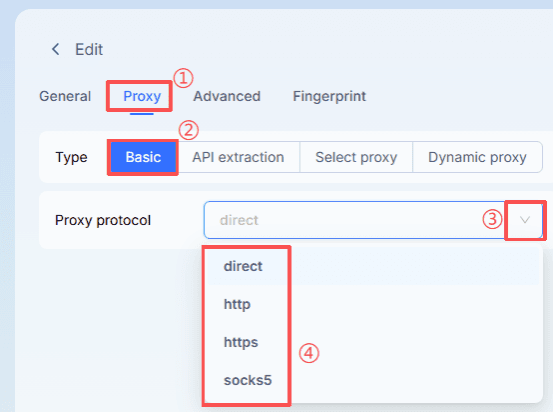
Open the MostLogin client and click "Create profile."
Click "Proxy" and select "Basic," then choose your proxy type from the drop-down list.
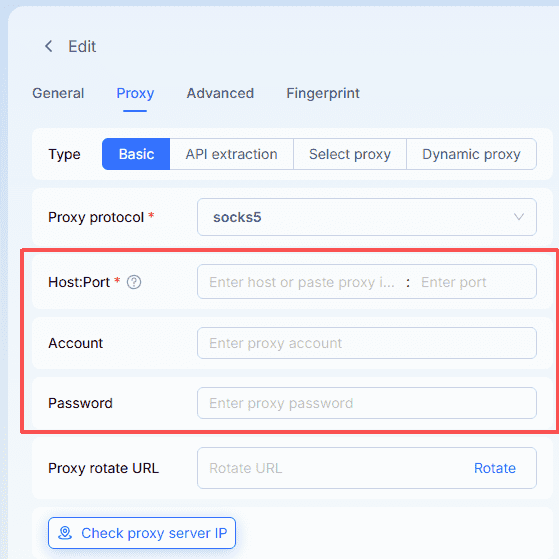
Enter your proxy information in the blank fields.
Final Thoughts
SOCKS5 proxy is a powerful network tool that offers high anonymity, supports multiple protocols, bypasses geographic restrictions, and optimizes network connections. Whether in cross-border e-commerce, data scraping, online gaming, or protecting privacy on public Wi-Fi, SOCKS5 proxy has a wide range of applications. Understanding its working principles and use cases will help you better leverage this tool to enhance your network experience and security.