How to Use Global Mobile Proxy IPs for City-Level Access



Clean IP picks: Static IPs from $1.5 each, Dynamic IPs from $0.5/GB


Nowadays, many people encounter situations where they need to "change IP" for accessing restricted platforms, performing multi-region testing, or data scraping. In such cases, global mobile proxy IPs become very important.
Many think that simply switching a proxy IP is enough, but in practice, city-level access involves many nuances: choosing the IP's ISP, geolocation verification, rotation strategies… each step directly affects access success.
Today, we will share some practical guidelines to help you easily achieve global city-level access. Whether it's data scraping, platform testing, or ad monitoring, you can get twice the result with half the effort.

1. What is aGlobal Mobile Proxy IP?
Simply put, it is using a proxy IP to "borrow" someone else's network exit, thereby changing your access source.
A "global mobile proxy IP" refers to IPs distributed across mobile networks worldwide, usually provided by ISPs or mobile device networks. The advantages of these IPs include:
• High anonymity: Unlike regular data center IPs which are easily blocked, mobile IPs resemble regular users more closely.
• Wide geographic coverage: Can cover major cities worldwide, enabling true geolocation-based access.
• Better stability: Mobile network IPs rotate constantly, but remain usable for short periods, making them ideal for data scraping or multi-city testing.
If you have used IP geolocation tools, you'll notice large differences in access effectiveness between cities. With the right IPDEEP proxy service, you can precisely control the access source, especially for city-level requirements.
2. How to Use Geolocation with Global Mobile Proxy IPs?
When it comes to geolocation, many people first think, "Isn't it enough to just change an IP?" Actually, it's not that simple.
Global mobile proxy IPs can achieve city-level access. The key is choosing a reliable proxy source and configuring it correctly. The specific steps are as follows:
1. Choose a reliable proxy provider
As mentioned earlier, IPDEEP is a recommended provider. It offers global mobile proxy IPs, marked with specific countries and cities for easy selection. Avoid cheap or free proxies, as they are unstable and lack precise geolocation.
2. Filter IPs by target city
• Before using a proxy, clearly define your access needs: nationwide testing or targeting a specific city?
• On the IPDEEP platform, you can filter IPs by city and even distinguish between mobile, Unicom, and Telecom ISPs.
3. Configure IP into tools or scripts
There are two main ways to use proxy IPs:
• HTTP/HTTPS proxy: Configure in a browser or scraping tool.
• SOCKS5 proxy: Suitable for advanced network applications like SSH or specialized software.
After configuration, use an IP geolocation tool to confirm the IP is in the target city. This step is crucial to avoid discrepancies during data scraping or restricted access.
4. Maintain IP rotation and stability
Mobile IPs generally rotate periodically. To ensure stable tasks, you can use IPDEEP's automatic rotation feature, so even if an IP becomes invalid, it won't affect overall access.
3. Practical Tips for City-Level Access
1. Choose IPs by ISP
Different ISPs provide very different access experiences, especially in strict access-limited scenarios, such as:
| ISP | Access Characteristics | Recommended Use |
|---|---|---|
| Mobile | More stable, high anonymity | Social platforms, multi-city data scraping |
| Unicom | Fast switching, high availability in some regions | E-commerce platforms, ad monitoring |
| Telecom | High bandwidth, but IP may get blocked | Video streaming or big data collection |
Selecting the right ISP via IPDEEP can significantly increase access success and prevent failures due to mismatched IP types.
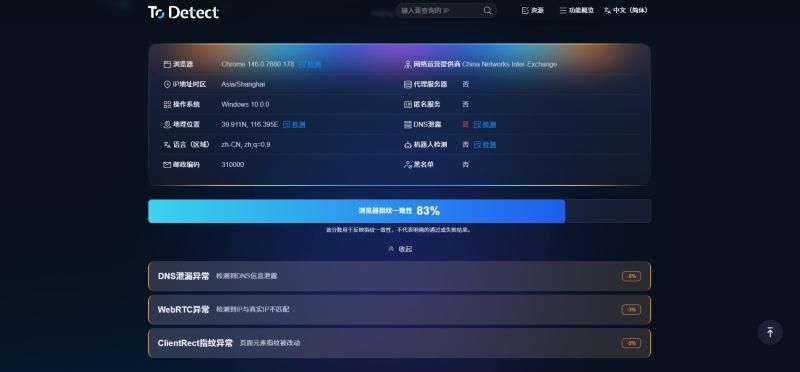
2. Verify IP withIP Geolocation
After selecting an IP, do not use it immediately. First, confirm the IP's geographic location with a geolocation tool.
Some mobile IPs may be labeled as a certain city but are actually tens or hundreds of kilometers off. This can cause data discrepancies in city-level access.
Steps example:
1. Choose an IP for the target city.
2. Enter the IP into an IP geolocation tool (like IPDEEP's interface or a third-party tool).
3. Check if the displayed city matches your target city.
4. Only after confirmation, import it into your tools or scripts.
3. Control IP rotation frequency
Frequent IP switching can trigger platform security, leading to blocked or restricted access. Rotate IPs based on your needs:
| Scenario | IP Rotation Strategy | Notes |
|---|---|---|
| High-frequency data scraping | Switch 1-2 IPs per hour | Ensure continuous access, do not switch too fast |
| Ad monitoring | Switch IPs daily | Keep access per IP within reasonable limits |
| Website testing | Fixed IP per task | Avoid repeated verification, save resources |
Using IPDEEP's automatic rotation ensures secure IP switching without affecting access stability.
4. Create an IP usage log
For large-scale city-level access tasks, record the status of each IP, including city, ISP, and availability. This helps optimize access strategies and avoid repeated testing of invalid IPs.
Example table:
| IP Address | City | ISP | Status | Last Used |
|---|---|---|---|---|
| 123.45.67.8 | Beijing | Mobile | Available | 2026-02-09 |
| 234.56.78.9 | Shanghai | Unicom | Used | 2026-02-09 |
| 98.76.54.32 | Guangzhou | Telecom | Available | 2026-02-08 |
Using a tabular management system allows you to easily track IP resources and quickly find available IPs, reducing operational costs.
5. Keep access behavior natural
Even if IPs and cities are selected correctly, simulate real user behavior, such as visit intervals, page dwell time, and click order.
Overly mechanical actions are easily detected by platforms. Combining mobile IPs with reasonable behavior strategies maximizes city-level access effectiveness.
Conclusion
To achieve precise city-level access with global mobile proxy IPs, focus on four steps: select IP and ISP → verify with IP geolocation → rotate IPs reasonably → keep an IP usage log.
If you are looking for a reliable global mobile proxy IP service, IPDEEP is undoubtedly a trustworthy choice.
You can start by testing IPs filtered for target cities, then combine rotation strategies and behavioral optimization to gradually build your city-level access "IP library."