Can You Still Use Your Old Static Residential IP After a Change?



Clean IP picks: Static IPs from $1.5 each, Dynamic IPs from $0.5/GB


In real-world business operations, users may encounter situations such as changing, expiring, or renewing an IP address.
This raises a common question: Can you continue using your original IP address after switching to a new static residential IP?
This article explores the technical principles, resource allocation process, and potential business impact to help you manage your static residential IP resources more effectively.

What Happens to Your Original IP After a Static Residential IP Change?
When you request a new IP, your access to the original IP will usually end.
Depending on the provider's resource management policies, the IP may be reclaimed, placed in a temporary holding period, or returned to the available IP pool.
The exact release timeline depends on the provider's resource management policies.
Resource Reallocation: Static residential IPs are typically provided through real residential networks or ISP resources.
Because high-quality residential IP resources are limited, providers need to manage and allocate them carefully.
Once you confirm the IP change and receive a new IP, your access to the original IP will normally end. The address may later be returned to the available IP pool and assigned to another user.
Limited Recoverability: In most cases, you cannot guarantee that you will be able to get the same IP address back after it has been released.
Even if the IP has not yet been reassigned, you may only be able to recover it if the provider supports IP restoration or purchasing a specific IP address.
Before switching, make sure there is a genuine reason to do so, such as connectivity issues, inaccurate location detection, or problems with a target platform, rather than making the change based on a misunderstanding.
Configuration Impact: Once you lose access to the original IP, IP-based allowlists and access control rules may no longer work or may need to be updated.
If the provider also changes the connection port or authentication details, you will need to update your proxy configuration accordingly to keep your business environment running normally.
When Can You Get Your Original IP Back?
Although an IP usually cannot be recovered after a voluntary change, there are a few situations where it may still be possible:
Accidental IP Change: If you accidentally clicked the change button in the dashboard and the IP has not yet been assigned to another user, contact your provider's support team as soon as possible.
If the original IP has not yet been fully released or reassigned, some providers may be able to help. However, the outcome ultimately depends on the IP's status and the provider's resource management system.
Node Maintenance: If the IP was temporarily changed due to infrastructure maintenance, whether you can get the original IP back depends on the reason for the maintenance and whether the IP is still available.
For businesses that rely on long-term IP stability, it is recommended to check the provider's IP replacement and migration policies in advance.
Potential Risks of Frequently Changing IPs
For long-term accounts, such as Amazon stores or Facebook accounts, frequent changes to the outgoing IP can introduce additional uncertainty.
Account Security Checks: A sudden change in IP may cause some platforms to request additional verification.
For account operations, frequent changes to the login environment can also increase security risks, so long-term accounts generally benefit from a more consistent network environment.
Business Disruptions: For API integrations that rely on IP allowlists, changing the IP means updating the relevant access control settings, which can increase maintenance costs.
Changes in IP Reputation: An IP that has been used consistently over time may already be well suited to your business.
When switching to a new IP, you may need to test its connectivity, reputation, and compatibility with your target platforms to make sure it meets your business requirements.
How to Keep Your Static Residential IP for Longer
To reduce the risk of unwanted IP changes, consider the following:
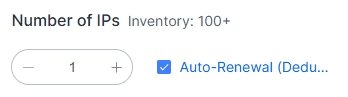
Renew Early / Enable Auto-Renewal: Don't wait until the expiration date to renew.
We recommend renewing 3–7 days in advance or enabling auto-renewal to avoid losing your IP because you forgot to renew.
Choose a Reliable Provider: Look for a provider with well-managed resources, stable IP sources, and transparent support policies.
Check its renewal, IP replacement, and expiration policies in advance so you know what to expect when support is needed.
Use a Dedicated Static IP: For critical business operations, choose a dedicated static residential IP to avoid sharing the same IP with other users.
Clearer renewal policies also make it easier to maintain a stable network environment for long-term operations.
Conclusion
After switching to a new static residential IP, you will usually lose access to the original IP.
Whether the address is released immediately, placed in a temporary holding period, or reassigned depends on the provider's resource management policies.
In most cases, you cannot guarantee that you will be able to get the same IP back.
If you're looking for static residential IP resources covering multiple countries with city-level targeting, visit the IPDeep official website to explore proxy solutions for different locations and business scenarios.
Frequently Asked Questions (FAQ)
Q1: Will my static residential IP change after renewal?
Normally, as long as you successfully renew your service before it expires, your IP address will remain the same.
Q2: Can I buy my original IP again after it has been released?
It depends on the available inventory. If the IP has not been reassigned and the provider supports purchasing a specific IP, it may be possible in theory.
However, this is not guaranteed, so check the provider's current inventory and policies.
Q3: Why did my static IP change even after I renewed it several times?
The provider may have a maximum usage period, or the change may be caused by node adjustments, changes to the underlying network resources, or changes in IP availability.
Check the provider's product policies for the specific reason.
Q4: How do I know whether a static IP is worth keeping?
Evaluate it based on factors such as connectivity, IP reputation, business compatibility, location accuracy, and stability.
If the IP performs well across these areas and meets your business needs, it may be worth keeping for the long term.