What is Error Code 520? How to Fix It?



Clean IP picks: Static IPs from $1.5 each, Dynamic IPs from $0.5/GB


In the process of digital office work or scientific internet access, accessing specific websites through a forward proxy is common. However, when you eagerly press Enter, only to be met with a cold Error 520: Web server is returning an unknown error, it usually means that there is an abnormal communication between your proxy IP and the target website.
Unlike the 520 error encountered during direct access, this error, when using a proxy, is usually related to inconsistencies in request identity or connection characteristics.
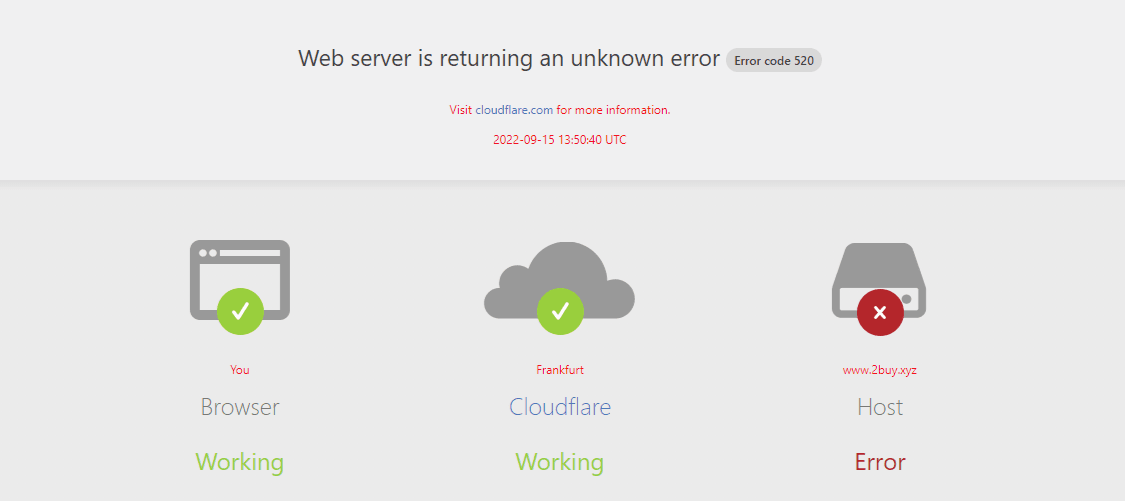
What is Error Code 520?
Error Code 520 usually appears on websites using Cloudflare, and its official definition is:
Web Server Returned an Unknown Error
It is important to note that 520 is a custom error code by Cloudflare and does not exist in the IANA standard HTTP status codes. This means that the error is primarily used to indicate communication anomalies between Cloudflare and the origin server, rather than traditional HTTP protocol errors.
🧠 Simple Understanding
Cloudflare successfully received your request, but when requesting data from the origin server, the server returned an abnormal or invalid response.
Why Does Using a Proxy Trigger Error 520?
In a proxy scenario, the request chain is: You (client) <-> Forward Proxy <-> Target Site Reverse Proxy (such as Cloudflare) <-> Target Origin Server.
Compared to direct connections, there is an additional "intermediate link," making it easier for anomalies to occur.
1. Response Header Overload and Tampering
Some forward proxies modify, delete, or inject additional HTTP request headers (such as Via, X-Forwarded-For) to achieve anonymization. If the injected information causes the request headers to exceed the 128KB limit of the target server (especially Cloudflare), it may trigger Cloudflare's request parsing anomalies, indirectly leading to a 520 error.
2. Connection Reuse (Keep-Alive) Conflicts
Proxy servers typically maintain long connections with the target server for efficiency. If the proxy server attempts to reuse a connection that has been unilaterally closed by the target server, or if the connection is interrupted during transmission, it will result in an "unknown response." In simple terms: Connection anomalies (such as connection interruptions or reuse failures) may lead to incomplete responses, triggering a 520 error.
3. "Soft Interception" of Security Policies
Many large websites use Cloudflare for protection. When it identifies that your request comes from a known proxy IP pool, it may not directly ban it (report 403), but respond with a complex CAPTCHA or non-standard challenges. If your proxy program cannot handle these challenges, it will misinterpret them as a 520 error.
4. HTTP/2 or Protocol Negotiation Anomalies
In some cases, if the origin server claims to support HTTP/2 but is not properly configured or experiences processing anomalies, it may also cause Cloudflare to be unable to correctly parse the response, thus returning a 520 error. In proxy or tunneling environments, TLS/ALPN negotiation (such as whether to enable HTTP/2) can also affect the final connection result.
Core Solution: Start from the Proxy Side
If you confirm that access is normal without a proxy but encounters errors when using a proxy, please follow these steps:
1. Change Proxy Protocol or Encryption Method
Different protocols (such as Shadowsocks, V2Ray, Trojan, HTTP/HTTPS Proxy) handle packets differently.
Try Reducing Encryption Strength: Some complex encryption algorithms may cause delays in packet parsing.
Switch Transport Protocol: If you are using UDP forwarding, try switching back to TCP, and vice versa. The TCP handshake mechanism is more advantageous in handling unstable connection situations like 520.
2. Disable "Request Header Modification" Feature of Proxy Plugin
If you are using a browser plugin proxy, check if there are settings to automatically inject User-Agent or other headers.
Clean Test: Try disabling all header-modifying extensions, keeping only the core proxy functionality.
Client (Browser) Side Auxiliary Fixes
1. Force Clear HSTS and Cache for Specific Sites
Browsers may remember the connection attributes of the site in a non-proxy state and try to apply them in a proxy state, causing conflicts.
Type chrome://net-internals/#hsts in the Chrome address bar.
In "Delete domain security policies," input the target domain name and delete it.
Thoroughly clear the cookies for this website to prevent the proxy from carrying expired session information that may cause oversized headers.
2. Switch DNS Resolution Scheme
Forward proxies often come with DNS leaks or resolution issues.
Enable Remote DNS: Ensure DNS resolution is completed on the proxy server side, rather than resolving the IP locally and then sending it to the proxy.
Try DoH: Enable "Use Secure DNS" (DNS over HTTPS) in the browser settings, selecting Google or Cloudflare's public DNS.
Contact Proxy Service Provider or Change IP
If the above technical adjustments are ineffective, the issue is likely not in your hands:
IP Quality Issues: The target website (reverse proxy end) may have blacklisted the IP of this proxy node. This is not a complete ban, but returns some non-standard packets to interfere with bots, resulting in a 520 error.
Countermeasures: Change to a different region or operator's Proxy IP.
Summary
The essence of error code 520 is a communication anomaly in the intermediate link. For websites using Cloudflare, it means that the origin server returned a response that could not be normally parsed.
In a proxy environment, this issue is further amplified. Due to the addition of the forward proxy link in the request path, any changes in request headers, unstable connections, or IP trust issues can lead to abnormal responses, triggering a 520 error.