IP Always Blocked? How to Hide Your Real IP with Mobile Proxies (With Practical Tips)



Clean IP picks: Static IPs from $1.5 each, Dynamic IPs from $0.5/GB


For users engaged in cross-border e-commerce, data scraping, social media operations, etc., the use of high-anonymity proxy IPs has become particularly important.
Mobile proxy IPs, as a new type of proxy method, utilize dynamically allocated IPs from 4G/5G networks, not only providing advantages in anonymity but also effectively preventing IP tracking and blocking.
Next, let me explain how to specifically use mobile proxy IPs to hide your real IP and what precautions to take during the process.

1. What isMobile Proxy IP? Why is it Safer?
Mobile proxy IP refers to IP addresses allocated through 4G/5G mobile networks for internet access. Compared to traditional data center IPs, its biggest advantage is that it is "more like a real person."
Because mobile network IPs are dynamically allocated by carriers, with a large user base and frequent changes, it is difficult for platforms to determine if you are using a proxy.
In contrast, regular proxy IPs are easily identifiable, and once flagged by the platform, they may face throttling or outright blocking.
2. How Does High-Anonymity Proxy IP Protect Your Real IP?
• When you access the internet directly, the request looks like this: 👉 Your device → Target website (exposing real IP)
• After using a mobile proxy IP: 👉 Your device → Proxy server → Target website
The target website sees the IP of the proxy server, not your real IP. This adds a layer of protection.
High-anonymity proxy IPs further optimize this process:
• Do not expose proxy information in the request headers
• Do not display fields like "via" or "proxy"
• Simulate real user access behavior
Therefore, from the website's perspective, this appears to be a regular user accessing it.
3. How Should Beginners Choose a Reliable IP Proxy Provider?
Honestly, this step is crucial. Many beginners fall into pitfalls because they choose the wrong IP proxy provider.
1. IP Purity
Whether the IP is clean directly determines the security of your account. If an IP is heavily abused, it can easily get blocked.
2. Support for Mobile Proxy IP
Not all proxy services provide mobile IPs; some only offer data center IPs, which are not suitable for high anonymity needs.
3. Stability and Speed
If the proxy IP frequently disconnects or has high latency, it will severely affect the user experience.
4. Support for Automatic IP Switching
Many scenarios (such as web scraping, account registration) require frequent IP changes, making the automatic switching feature very important.
Platforms like IPDEEP perform well in mobile proxy IPs, supporting high anonymity mode, quick IP pool updates, and relatively simple operations.
4. Comparison Table of Common Proxy IP Types
| Comparison Dimension | Mobile Proxy IP (4G/5G) | Data Center Proxy IP | Residential Broadband Proxy IP |
|---|---|---|---|
| IP Source | Carrier Mobile Network | Data Center Servers | Residential Broadband User Network |
| Anonymity | High (mostly high-anonymity proxy IPs) | Medium (easily identifiable) | Relatively high (close to real users) |
| IP Purity | High (dynamically allocated) | Low (high reuse rate) | Medium (partially shared) |
| Risk of Being Blocked | Low | High | Medium |
| Suitable Business Scenarios | Account Operations, Cross-Border, E-commerce | Large-Scale Data Scraping | Social Media Account Management, Content Access |
| IP Change Frequency | Fast (supports automatic switching) | General (some support) | Slow (requires manual or script control) |
| Cost | Moderately High | Low | Medium |
| Usage Threshold | Low (suitable for beginners) | Medium | Medium |
5. Step-by-Step Guide to Using Mobile Proxy IP (Beginner Steps)
Step 1: Register and Obtain Proxy Information
After registering an account on the IP proxy provider's platform, you will generally receive: IP address, port number, username/password (or API interface).
Step 2: Configure the Proxy
You can set it up according to your usage scenario:
• Browser Proxy (suitable for daily access)
• Software Settings (e.g., web scraping tools)
• System-wide Proxy
For example, in Chrome, you can quickly set up the proxy through an extension, which is very convenient.
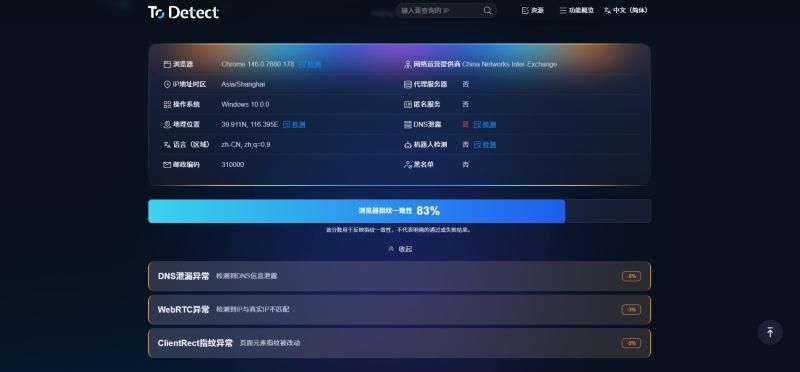
Step 3: Test if the IP is Effective
• Open an "IP checking website" to see if the displayed IP is the proxy IP, not your local real IP.
• If it displays correctly, it means you have successfully hidden your real IP.
Step 4: Set IP Switching Strategy
• Set according to your needs: change IP with each request, change IP at regular intervals, or keep a fixed IP for a period.
• This step is very important for batch operations, as it can effectively reduce risks.
6. Common Use Cases for Mobile Proxy IP
Many people may ask what it is used for. In fact, there are quite a few application scenarios, such as:
1. Multi-Account Operations
Avoid IP duplication between accounts to prevent being recognized and associated by the platform.
2. Data Collection/Scraping
By constantly changing IPs, prevent being blocked and improve collection efficiency.
3. Cross-Border E-commerce/Social Media Operations
Simulate user access from different regions to enhance account authenticity.
4. Advertising Testing
Different regional IPs can test the effectiveness of ad displays. In these scenarios, the combination of high-anonymity proxy IPs and mobile IPs is basically standard.
7. Common Pitfalls for Beginners UsingMobile Proxy IP (Must Avoid)
Finally, here are a few common pitfalls:
△ Pitfall 1: Only Looking at Price
Cheap proxies often have poor IP quality and can easily get blocked, which is not worth it.
△ Pitfall 2: Long-Term Use of the Same IP
Even high-anonymity proxies are not recommended for long-term fixed IP usage.
△ Pitfall 3: Ignoring IP Environment Consistency
If the IP, device, and browser fingerprints do not match, it may also be recognized.
△ Pitfall 4: Not Testing Before Scaling Up
It is recommended to test the IP quality on a small scale before using it on a large scale.
Conclusion
Using high-anonymity mobile proxy IPs to protect your real IP not only effectively reduces the risk of being blocked but also enhances operational stability and privacy.
Of course, choosing a reliable IP proxy provider (like IPDEEP) and properly configuring and switching mobile proxy IPs are crucial at every step.
If you are just starting to explore these, it is recommended to begin with simple scenarios, such as browser proxies, and gradually delve into automated operations. You will slowly find that mobile proxy IPs are a very practical tool.