Static Residential Proxy Quick Start Guide



Clean IP picks: Static IPs from $1.5 each, Dynamic IPs from $0.5/GB


In cross-border e-commerce, SEO optimization, data collection, and account management, a stable and secure network environment is becoming increasingly important. Many users encounter issues such as frequent IP changes, access restrictions, or account risk control when using ordinary proxies. In contrast, static residential proxies (Static Residential Proxy) have become the preferred choice for more and more businesses and individual users due to their real IP source and stability.
This article will provide you with a detailed introduction to what static residential proxies are, how they work, and how to quickly get started using them, helping you establish a stable and reliable network access environment.
What is a Static Residential Proxy
A static residential proxy is a proxy IP that comes from a real home broadband network and remains fixed for a long period.
In simple terms, it has two core characteristics:
1. Residential IP Source
The IP comes from the home network of a real Internet Service Provider (ISP), rather than a data center server, making it appear more like a regular user accessing the site.
2. Long-term IP Stability
Unlike dynamic residential proxies, static residential proxies remain unchanged for a certain period, allowing users to operate with the same IP for a long time.
It can be understood as:
If dynamic residential proxies are like "constantly changing temporary numbers," then static residential proxies are more like "a long-term fixed home phone number."
Why Choose Static Residential Proxies
Compared to ordinary proxies, static residential proxies have significant advantages in several aspects.
Higher Credibility
Since the IP comes from a real residential network, websites usually recognize this type of access as normal user behavior, making it harder to trigger risk control systems.
More Stable Connections
Static residential proxies do not frequently change IPs, which is very important for tasks that require long-term logins or continuous access.
Reduced Account Risk Control
When managing multiple accounts or operating platforms, a fixed residential IP can avoid abnormal behavior recognition caused by frequent IP changes.
Better Data Consistency
In scenarios like SEO ranking monitoring and market research, a stable IP can ensure consistent data sources, avoiding errors caused by frequent changes.
Quick Start Using Static Residential Proxies
1. Register an Account
First, register and log in on the IPDeep official website to enter the dashboard.
2. Purchase Static Residential Proxies
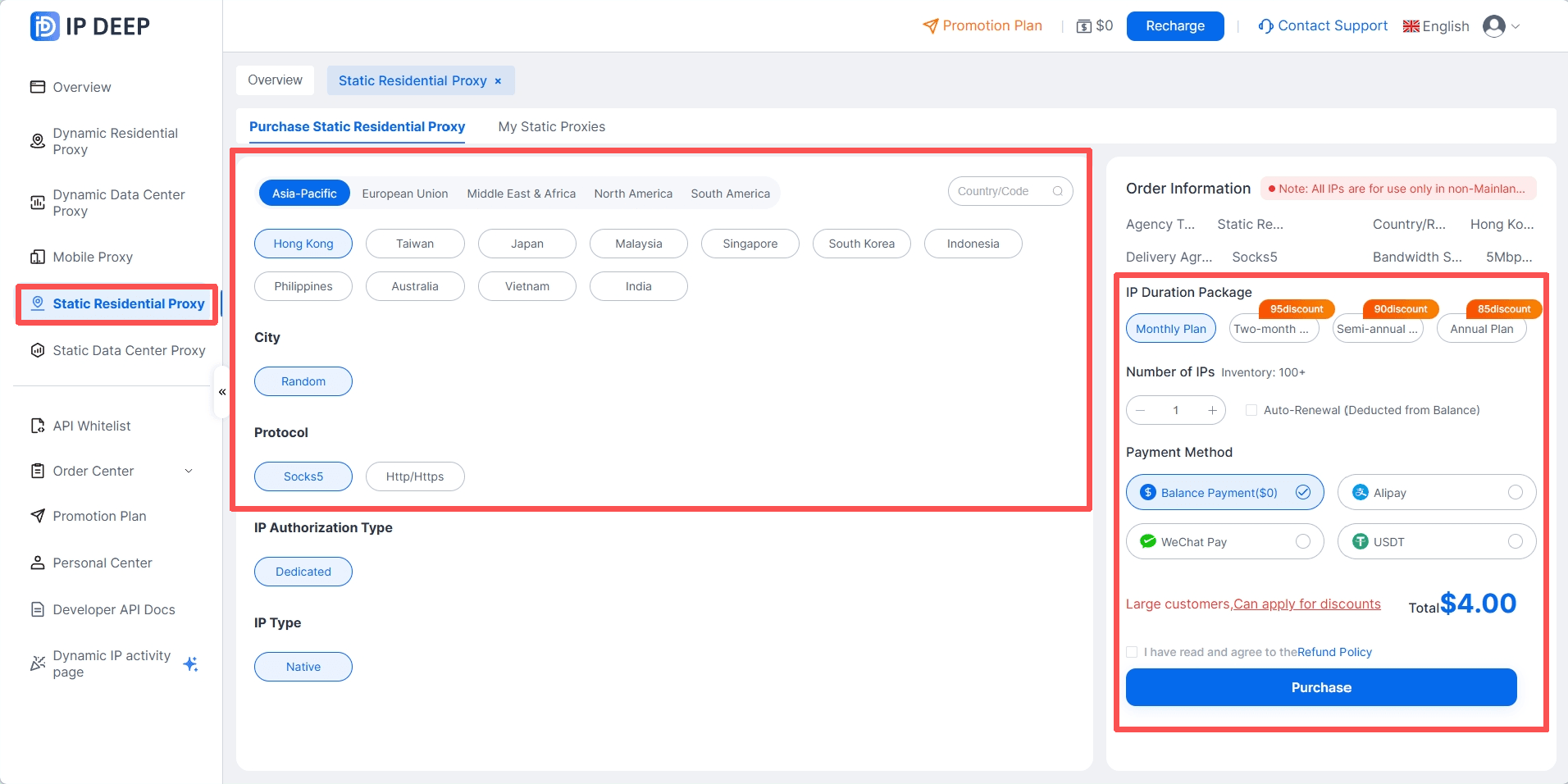
Select static residential proxies on the left; choose the proxy location; select the protocol type; choose the duration and quantity of IP usage; select the payment method, and click to purchase.
3. Retrieve Static Residential Proxies
Click on "Purchased Static Residential Proxies" to view all purchased static residential proxies;
Click the copy button next to the server/port and account password to retrieve.
4. Test if the Proxy is Successful
After configuration, you can visit an IP detection website to confirm whether the current IP has changed to the proxy IP. If the displayed IP address matches the proxy information, it indicates that the proxy configuration was successful.
Common Error Codes
When using static residential proxies, you may receive response codes indicating success or failure with specific reasons. You can refer to the following articles for specific reasons and solutions.
Conclusion
As internet platforms become stricter in detecting access environments, a stable and secure network IP environment has become a fundamental requirement for many online businesses. For users looking to establish a stable network environment, mastering the basic principles and usage methods of static residential proxies can significantly enhance network operation efficiency and reduce risks associated with access restrictions.
IPDeep offers a variety of high-quality proxy IPs, including:
With over 10 million high-quality IP resources covering more than 200 countries and regions worldwide, whether it's breaking geographical restrictions, ensuring data collection, or enhancing access speed and security, IPDeep can provide you with stable and reliable support, making your network operations smoother and more efficient.