Claude Registration: Bypass Geo-Restrictions with a UK Proxy



Clean IP picks: Static IPs from $1.5 each, Dynamic IPs from $0.5/GB


With the widespread adoption of AI tools, large models like Claude and ChatGPT are providing users with powerful content generation and data processing capabilities. However, due to various restrictions, some users in unsupported regions may encounter geo-blocking when accessing Claude.
This article will explain how to use a UK proxy IP to bypass Claude's geo-restrictions, complete email and phone verification, and successfully log in.

What is Geo-Restriction?
Geo-restriction refers to access limitations imposed by service providers based on the user's IP address.
Claude's servers may only allow access from specific regions. If your IP appears to be in an unsupported area, such as mainland China, you will receive an access or network error message. Such restrictions are common across digital services worldwide.
Before proceeding, it’s important to understand Claude’s blocking mechanisms.
Claude not only checks your current IP address but also scans the following aspects:
IP Type: Most cheap or free VPNs provide data center IPs, which are flagged by Anthropic’s security system as "suspected bots" or "high-risk tools."
Browser Fingerprint: Even if your IP is in the UK, your timezone, system language, and WebRTC (Web Real-Time Communication) can leak your real IP and reveal your actual location.
Account Traceability: The registration email and phone number must match the IP location.
Setting Up a Clean UK Network Environment
1. Choose a Residential Proxy
Residential proxies are UK IPs assigned by real UK household broadband, making you appear as a local UK user.
Residential proxies are available as dynamic or static. Static proxies combine the speed of data center IPs with the cleanliness of residential IPs.
· Avoid using shared free VPN nodes commonly available on the market.
2. Obtain a UK Residential Proxy IP
Log in to IPDeep’s official website, select a static UK residential proxy, and prioritize major city nodes.
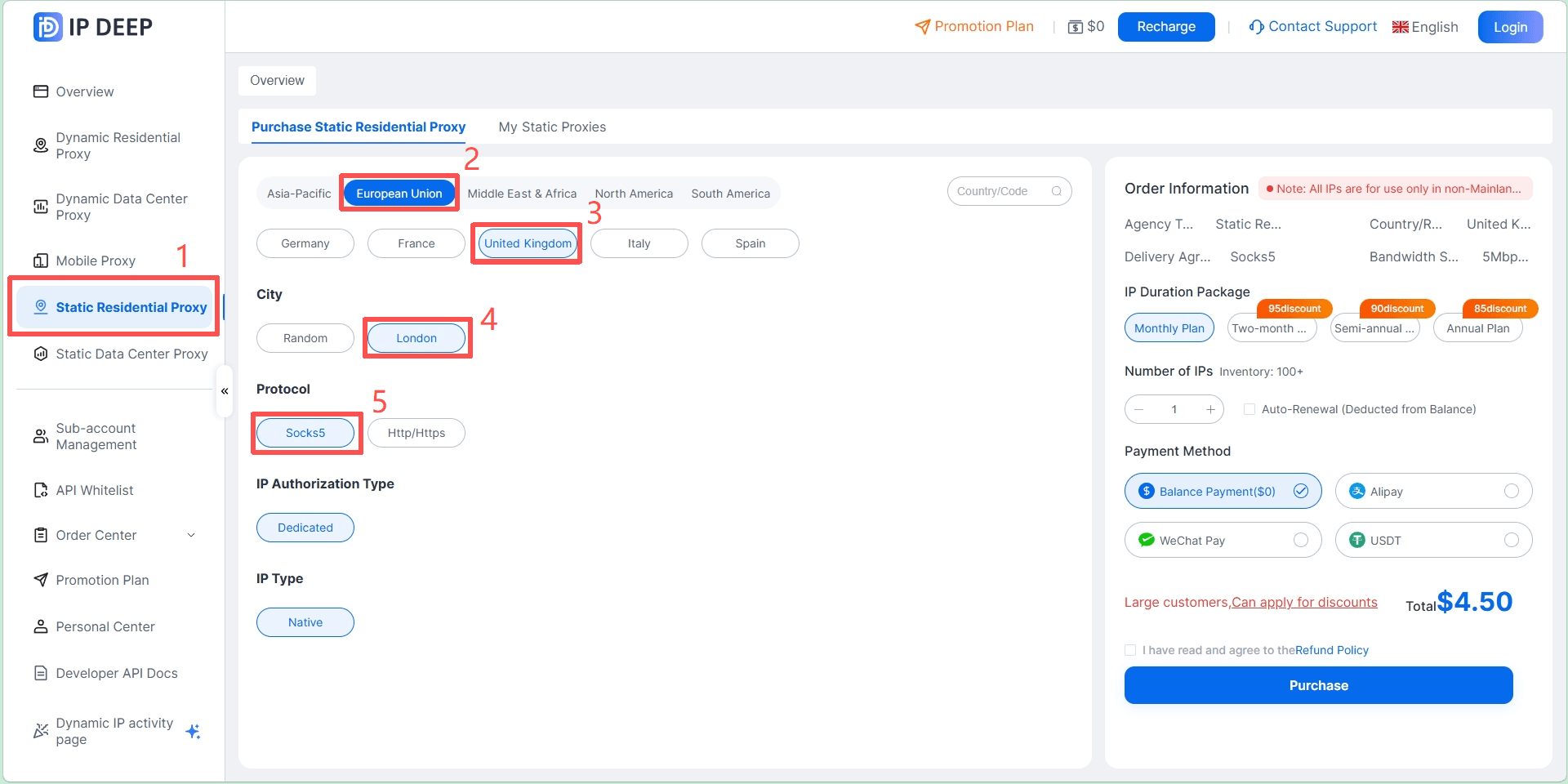
· Protocol Selection: SOCKS5 is recommended for higher transmission efficiency and better anonymity compared to standard HTTP proxies.
3. Prevent WebRTC IP Leaks
Even with a global proxy enabled, the browser’s built-in WebRTC may bypass the proxy and reveal your real LAN IP to servers.
Method 1: Download and enable a WebRTC leak prevention extension from the Chrome Web Store.
Method 2: Use a fingerprint browser, which allows configuring IP, timezone, fonts, and GPU fingerprints independently for each window. This is currently the most reliable way to isolate your environment.
Handling Email and Phone Verification
Claude’s registration barriers mainly involve email reputation and overseas SMS verification.
1. Email Selection
Avoid using QQ, 163, or other domestic email domains.
Recommended: Use Gmail or Outlook for registration.
If your Gmail registration environment is also based in your home country, it’s recommended to keep your email active for a few days under a UK proxy IP before logging into Claude.
2. Phone Number Verification
Claude requires a phone number for registration (SMS Verification).
Choosing a Number Provider: Use a paid SMS service.
Key Point: When selecting a number, try to choose a UK physical SIM, as it has a higher success rate for registration.
Tips: You are not charged if you don’t receive the verification code. If you see "Unsupported Provider," try a different number.
Login Procedure
Environment Check: After enabling the UK proxy, visit an IP checking tool. Ensure the IP Address, WebRTC Detection, and DNS Address all show UK locations, and adjust your system time to the UK timezone.
Access the Website: Go to claude.ai. If you see “Not available in your region,” it means your proxy IP has been detected. Switch to a different IP and avoid forcing login.
Registration Steps: Enter your Gmail -> retrieve the verification code from your email -> input the UK phone number -> get the SMS code from the service -> complete registration.
Fill in Details: You can enter any English name. Click confirm on the "How should we address you?" prompt.

Anti-Ban Guidelines
Use a Consistent IP: Try to log in from the same region each time. Frequently switching between London, Manchester, and Birmingham may trigger account sharing or suspicious login flags.
Avoid Frequent Refreshing: Do not repeatedly refresh the login page in a short period, especially on an unstable network.
Clear Traces: If you want to log into a second account on the same browser, clear cookies completely or use incognito mode.
Follow Rules: Avoid asking Claude overly sensitive questions. For first-time conversations, stick to academic or technical inquiries to build a healthy account profile.
FAQ
1. What should I do if my account gets banned after some time?
Avoid repeatedly attempting to log in to prevent triggering security mechanisms. First, check if your proxy IP is stable and your environment is clean, then submit an appeal through official channels with registration details and operation records.
2. Can sending an appeal email to the Claude team lift the ban?
You can try, but success depends on the severity of the violation and the completeness of your appeal. Providing registration info, environment details, and a reasonable explanation can increase your chances.
3. Will using a data center proxy definitely get my account banned?
Not necessarily. Some users report using private data center IPs without bans, but residential proxies are still recommended.
4. Do I have to use a UK phone number to register for Claude?
Not necessarily. A US phone number can also work. The key is to keep the email and phone number consistent with your login environment.
5. What if my ClaudePro subscription account gets banned?
This usually happens due to abnormal payment environments. If your subscription is banned, you should receive a refund email. Pause using the current environment and submit an appeal via official support or customer service.