What is PAC Mode? How to Set Up PAC Mode?



Clean IP picks: Static IPs from $1.5 each, Dynamic IPs from $0.5/GB


PAC mode (Proxy Auto-Config) is a mature automatic proxy configuration technology that offers users and businesses a flexible and free way to switch proxies. This article will explain the concept and setup process of PAC mode in detail. Let’s dive in.
What is PAC Mode?
PAC mode is a technique that uses a script file to automatically configure proxy settings. At its core is a JavaScript script called a PAC file, which determines whether each network request should use a proxy and which proxy server to use.
Within the PAC file, you must define a function called FindProxyForURL(url, host). This function returns the appropriate proxy strategy based on the requested URL and hostname.
Common return values include:
DIRECT — Connect directly without using a proxy
PROXY proxy_server_IP:port — Forward through the specified proxy server
SOCKS proxy_server_IP:port — Access via a SOCKS proxy
By writing conditional logic, PAC mode allows users to automatically switch proxies based on different target websites, IP address ranges, or even time periods, avoiding the hassle and errors of manual configuration.
Example PAC File
This example uses dnsDomainIs and shExpMatch to evaluate the domain and hostname to decide the proxy method.
Advantages of PAC Mode
Smart Proxy Selection
PAC scripts automatically determine whether to use a proxy and which proxy to use based on the destination.
Improved Access Efficiency
Only traffic that requires a proxy goes through the proxy server, while other traffic connects directly. This reduces the load on proxy servers and improves overall speed.
Easy Maintenance
Adjusting proxy strategies is as simple as modifying the PAC script, eliminating the need to configure each device manually and simplifying management.
Wide Compatibility
Almost all major browsers and operating systems support PAC mode, ensuring excellent compatibility.
How to Set Up PAC Mode?
1. Purchase Proxy Services
For real-world applications—especially in cross-border e-commerce, social media account management, and data collection—high-quality and stable proxies are crucial.
IPDEEP offers a range of proxy types, including dynamic residential IPs, static residential IPs, data center IPs, and mobile proxies. These proxies provide authenticity, stability, and high anonymity, effectively handling network blocks and risk controls.
2. Write Your PAC File
Create or customize a PAC file according to your needs.
3. Configure PAC File in Your System
For Windows:
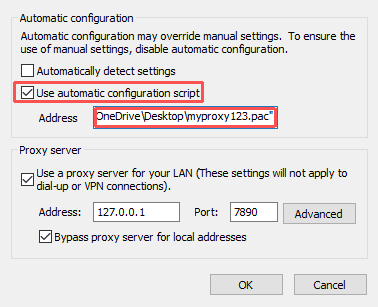
Go to Control Panel → Internet Options → Connections → LAN Settings, check "Use automatic configuration script," and enter the URL or local path of your PAC file.
4. Test Your Setup
Visit target websites to confirm traffic is routed through the proxy. Use IP detection tools to verify that your IP changes accordingly and the proxy is effective.
Summary
PAC mode is a powerful tool for automatic proxy configuration. Using scripts to flexibly direct traffic, it greatly simplifies proxy management. When combined with IPDEEP’s premium proxy resources, users can develop smarter, more efficient proxy strategies tailored to various business scenarios, reducing risk and ensuring stable operations.
FAQ
1. Can SOCKS5 proxies be used directly with PAC files?
If the SOCKS5 proxy does not require authentication, it can usually be configured and used directly in PAC files, and browsers will connect normally. However, if the SOCKS5 proxy requires a username and password, simply importing a local PAC file won’t complete the proxy authentication, preventing normal internet access. In this case, additional tools must be used alongside PAC files.
2. Why doesn't PAC mode take effect immediately after setup?
This is a common issue usually caused by cached old PAC files in the browser or system, or because the PAC file hosted locally or on a server hasn’t refreshed yet. Sometimes, browsers need to be restarted after configuration changes. If you encounter this, try refreshing or restarting your browser, toggling the proxy settings off and on again, and clearing proxy caches in your system or browser.