How to Get the Gemini Student Plan with IPDeep



Clean IP picks: Static IPs from $1.5 each, Dynamic IPs from $0.5/GB


With the rapid development of artificial intelligence technology, Google's Gemini (formerly Bard) has become a powerful assistant for learning, research, and creative work. To give back to the educational community, Google often launches student discount packages such as "Google AI Pro" or "Gemini Advanced" for students in specific regions worldwide, usually including a one-year free usage period and 2TB of cloud storage.
However, due to geographical restrictions (Geo-blocking) and network environment requirements, many eligible students located in unsupported regions often encounter obstacles when applying. This article will explore in detail how to use IPDeep Proxy IP services to simulate a compliant network environment and successfully unlock and apply for the Gemini student plan.

Preparation: Understand the Application Requirements
Before using technical means, we need to clarify Google's core requirements for the Gemini student plan:
1. Identity Verification: Must be a college student aged 18 or older.
2. Verification Channel: Typically verified through a third-party service provider SheerID for proof of enrollment.
3. Account Requirements: Must use a personal Google account (not a school Workspace account).
4. Payment Method: Although the first year is free, a valid payment method (such as a credit card or financial card that supports international payments) must be linked to verify the account.
5. Geographical Location: Applicants must be located in specific countries or regions that support the program (such as the United States, Australia, etc.).
Why Use IPDeep? Google detects users' physical locations through their IP addresses. If your IP shows you are in an unsupported area, the application page may directly display "Your region is not supported." The clean and high-speed Residential Proxy IP provided by IPDeep can effectively simulate the real user environment of the target area, significantly improving the success rate of SheerID verification.
Phase One: Configure the IPDeep Proxy Environment
Using a proxy IP to apply for student discounts hinges on "anonymity" and "stability." Ordinary public VPNs are often flagged by Google because their IPs are shared by multiple users. The advantage of IPDeep lies in its rich Residential IP Pool.
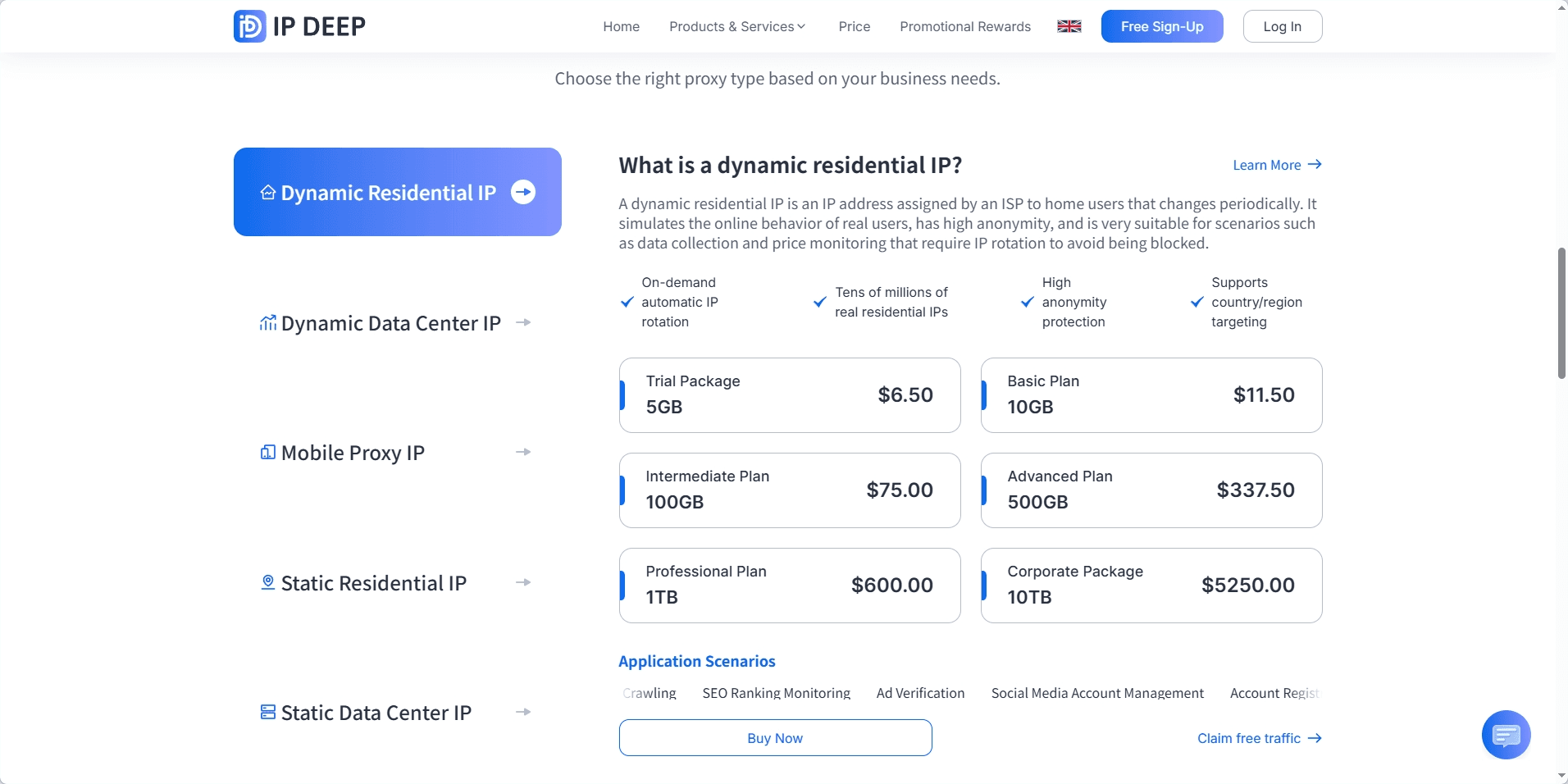
1. Choose the Right Proxy Type
After entering the IPDeep backend, it is recommended to select "Dynamic Residential Proxy" or "Static Residential Proxy". For the application process, static residential IPs offer better stability, avoiding security warnings caused by IP changes during form filling.
2. Locate the Target Area
Based on Google's current activity range, select the corresponding country. For example, if the current discount is primarily aimed at students in the United States, please select "United States" in the IPDeep extraction interface. If you are a student at a university in a supported region, choosing a proxy IP from your school's city will increase your success rate.
3. Extraction and Configuration
· Obtain proxy information (IP address, port, username, and password).
· Recommended Tools: Use a fingerprint browser or configure the proxy in local, proxy management software, or Google Chrome extensions.
· Check Anonymity: After configuration, visit an IP address detection tool to ensure the displayed IP location matches the target and that the anonymity score is above 90%.
Phase Two: Enter the Gemini Student Program Application Process
Once the environment is set up, you can begin the official application.
1. Visit the Official Entrance: In the browser configured with the IPDeep proxy, visit the Google One or Gemini official student discount page. You will find that the previously unavailable gemini.google/students page is now accessible.
2. Log in to Your Personal Google Account: Ensure that this account has not been linked to payment information from restricted regions. If this account has frequently been used in unsupported areas, it is recommended to clear the browser cache or use incognito mode.
3. SheerID Identity Verification: This is the most critical step. The system will redirect to the SheerID page, requiring you to fill in the school name, your name, and your date of birth.
· Upload Proof: If SheerID cannot automatically verify, you need to upload a scanned copy of your student ID or proof of enrollment. Please ensure that the name on the document matches the name on your Google account.
· Maintain Consistent IP: During the upload and submission process, do not close or switch the IPDeep proxy IP; otherwise, a sudden change in geographical location may cause verification failure.
4. Link Payment Method: After verification, proceed to the payment page to link your payment method and pay 0 yuan.
Do not use unconfigured proxy SheerID bypass scripts or verification bots, as these tools can easily lead to your student email being permanently banned, preventing you from applying for any discounts in the future.
Pitfall Guide: Common Issues When Using Proxies
Even with high-quality tools like IPDeep, improper operation can still lead to failure. Here are some summarized experiences:
· DNS Leak: Some proxies may hide the IP, but the DNS still shows the original location. Please enable "Secure DNS" in your browser settings or configure it in other tools to ensure DNS synchronization.
· Account Weight: If your Google account has never left a specific city and suddenly appears in the United States, it may trigger risk control. It is recommended to browse Google Search and YouTube after using the proxy to simulate real user behavior, and wait for a while before applying.
· Payment Card Region Conflict: If the IP is in the United States but the payment card is purely Chinese, it may sometimes trigger a refusal. It is recommended to use a virtual credit card that supports multiple currencies or ensure that the billing address of the payment account is logically consistent with the proxy IP region.
Conclusion
Using IPDeep Proxy IP along with a valid student identity is an effective way to access top global AI resources. The Gemini student plan not only allows you to experience the deep research capabilities of Gemini 1.5 Pro (and even the latest 3.1 Pro model in 2026) for free but also greatly alleviates academic pressure.
Special Reminder: Proxy technology should only be used for legitimate academic applications and network optimization. After a successful application, it is recommended to regularly back up data and pay attention to Google's renewal policy to avoid unnecessary charges after the free period ends.