Bought a US Mobile Proxy but Not Sure How to Use It? A Simple Setup Guide



Clean IP picks: Static IPs from $1.5 each, Dynamic IPs from $0.5/GB


Many friends who just entered the cross-border field think that as long as they register an account and choose a product, they can get started. The reality quickly hits back— the account shows anomalies just two days after logging in.
When working on overseas platforms, many people encounter the same keyword— mobile proxy IP. Especially for the US market, US proxy IP has almost become a standard configuration.
Next, I will explain in detail how to use the US mobile proxy IP after purchasing it? How to use it safely? Is it just a matter of filling it into the browser?

1. Why Cross-border Beginners Must UnderstandMobile Proxy IP?
When you operate a US TikTok account, Facebook ad account, or independent site backend from within China, the platform recognizes your real IP as a domestic fixed broadband IP, directly labeling you as "high risk."
At this point, the US proxy IP comes into play. It can closely mimic the internet behavior of ordinary users. In the eyes of the platform's risk control, it appears more "clean" and natural.
In simple terms:
Data center IP = easily recognized as bulk operations
Residential IP = simulates home broadband
Mobile proxy IP = simulates real mobile user networks
For cross-border social media, product testing, account registration, account nurturing, and ad placement, the stability and concealment of mobile IPs are indeed more user-friendly.
2. How to Choose a Proxy IP Service Provider When Buying a US Proxy IP for the First Time?
To be honest, there are too many proxy IP service providers on the market, and beginners can easily be attracted by low prices, leading to pitfalls.
1. Does it support US mobile IP resources?
Some vendors only offer data center IPs but claim to provide "high anonymity proxies."
You must confirm: whether they truly offer real US mobile proxy IP resources, not just regular data center IPs.
2. IP purity
In the cross-border community, there's a saying: if the IP is not clean, everything is in vain. If an IP has been abused by many users, registering an account will likely get banned immediately.
Service providers like IPDEEP, which emphasize high purity mobile IPs, usually highlight IP rotation mechanisms and user control, which is crucial.
3. Does it support exclusive or low concurrency?
If one IP is used by dozens of people simultaneously, it's strange if the platform doesn't implement risk control. It's advisable for beginners to choose exclusive IPs or low concurrency mobile IP packages first.
4. Does it support flexible billing based on traffic/time?
For beginners, it's not recommended to buy a large package all at once. You can start with a small traffic package to test the stability of the environment.
3. How to Buy Your First Mobile Proxy IP? Specific Steps
Step 1: Register an account with the proxy IP service provider. Log into the provider's backend, complete registration and recharge.
Step 2: Choose a US mobile proxy IP package. Pay attention to the filtering conditions:
Country: United States
Type: Mobile Proxy IP
Protocol support: HTTP / HTTPS / SOCKS5 (depending on your software needs)
Does it support API IP switching?
Step 3: Obtain proxy information
Generally, you will receive an IP address + port + username + password, or an API link for dynamic IP extraction.
4. How to Use theUS Mobile Proxy IP After Purchase? A Beginner's Operation Guide
Many people buy US proxy IPs but don't know how to use them, which is the biggest problem.
1️⃣ Browser Usage (The Simplest)
If you are just doing account login tests, you can use a fingerprint browser and fill in the IP information in the browser's proxy settings.
It is recommended to use it with a fingerprint browser to avoid inconsistencies in browser fingerprints, cookie conflicts, and multi-account associations.
2️⃣ Software Integration Usage
For bulk registration, data collection, and ad management, you can fill in IP:Port:Username:Password in the software's proxy settings.
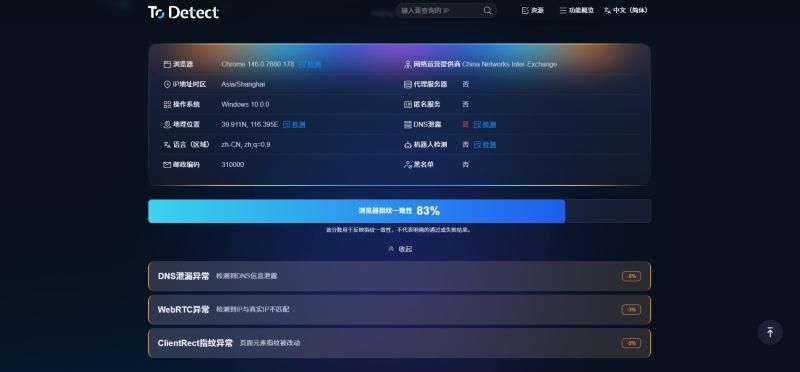
Test whether you can normally access US websites, such as:
• TikTok US
• Facebook US
• Confirm that the IP is genuinely located in the US
3️⃣ New Practical Tip 1: Set Fixed Duration IP Rotation
Many mobile proxy IPs support: automatic IP change at fixed intervals (e.g., 5 minutes, 30 minutes), and API manual IP switching.
⚠️ But note: if you are in the account nurturing stage, frequent rotation is not recommended.
Correct Approach:
• Account nurturing → Fixed IP for 3-7 days
• Data collection → Short-term rotation allowed
• Ad running → Fixed IP is safer
Choosing a proxy IP service provider that supports rotation control is crucial. For example, IPDEEP, which supports API switching for US mobile proxy IPs, is more suitable for bulk operations.
4️⃣ New Practical Tip 2: Use with Remote Desktop Environment
Many people overlook an issue: your local computer is a Chinese system + domestic time zone, but you use a US proxy IP to log into a US account, which can easily trigger risk control.
• A more secure approach is to rent a US VPS, configure the mobile proxy IP within the VPS, and operate remotely.
• This way, your time zone, language, system environment, and IP address are all unified to the US environment.
• This step marks the transition for cross-border beginners from "playing around" to "professional operation."
5️⃣ New Practical Tip 3: Bind to Independent Projects, Do Not Mix IP Pools
This is the most common mistake made by beginners. Many people buy a US mobile proxy IP package and then:
• Use it for TikTok
• Use it for Facebook
• Use it for independent site backend
• Even use it for data collection software
This can easily cause abnormal IP behavior, sudden traffic spikes, and account associations. The correct approach:
• One IP corresponds to one project
• One IP pool should only run similar types of business
• Separate data collection IPs from account IPs
The core of mobile proxy IPs is to "simulate real users"; real users do not perform so many tasks simultaneously.
6. Common Issues During the Use of US Proxy IPs
1️⃣ What to Do If IP Latency Is High?
• Mobile proxy IPs inherently have higher latency than data center IPs, which is normal.
• However, if you experience: inability to open web pages or frequent disconnections, it may be a quality issue with the proxy IP service provider's line.
2️⃣ Why Is It Showing a US IP but the Account Is Still Banned?
• Possible reasons include: abnormal browser fingerprints, multiple accounts associated with the same device, the IP being previously abused, overly aggressive behavior; the IP is just part of the risk control, not everything.
3️⃣ How to Determine IP Purity?
• You can test by registering a new account, checking the IP's historical blacklist status, and querying the IP's reputation score; selecting a stable US proxy IP resource pool is crucial.
Conclusion:
When starting cross-border work, don't expect to achieve everything at once. Choose a reliable proxy IP service provider, buy a stable US mobile proxy IP, set up the environment, and test gradually.
A clean IP + reasonable operational pace + stable device environment, these three elements are indispensable. The IP is just infrastructure, like the foundation of a house; if the foundation is unstable, no matter how luxurious the decoration is, it won't work.
I hope this sharing can help you avoid some pitfalls. On the cross-border journey, being steady is more important than being fast.