How to Tell if Your Mobile Proxy IP is Blocked: A Veteran User’s Guide to Spotting It at a Glance



Clean IP picks: Static IPs from $1.5 each, Dynamic IPs from $0.5/GB


When doing web scraping, e-commerce operations, account management, or data collection, mobile proxy IPs have almost become a necessity. However, many people encounter the following situation:
The proxy IP connects fine, the code shows no errors, but the target platform just won’t load. At best, it repeatedly triggers captchas; at worst, it returns a 403 Forbidden error. This is usually because the proxy IP has been blocked or restricted.
Next, we will explain everything from the signs that an IP is blocked to practical methods for testing mobile proxy IPs, so that those planning to use proxies can benefit.

1. How to tell if amobile proxy IP might be blocked?
An IP being blocked does not necessarily mean it is permanently blacklisted; more often, it is “partially blocked” or has restricted access. If you encounter two or more of the following situations, you should pay attention:
• The target website returns 403 / 429 / 302 abnormal redirects
• Incomplete page loading, images or API requests fail
• High access frequency causes disconnections, while single requests work normally
• The same proxy IP works on some sites but not others
• Switching IP immediately restores normal access
These phenomena all point to the same issue: the current proxy IP is being recognized and restricted by the target site.
2. The most direct methods to detect a blocked IP (essential for beginners)
1️⃣ Manual browser access test (simple but effective)
This is the simplest and most intuitive method for testing mobile proxy IPs:
• Configure the proxy IP in your browser
• Open the homepage of the target website
Refresh a few times and observe the loading. If you encounter:
• Frequent captcha prompts
• “Access abnormal” page messages
• Or direct refusal of access
Then you can basically conclude that this proxy IP is on the risk control list.
📌 Advantage: Simple and intuitive
📌 Disadvantage: Low efficiency, not suitable for batch testing
2️⃣ Compare with local IP access
A very practical trick:
• Access the same page using your local network once
• Then access it again using the mobile proxy IP
If the local access works but the proxy fails, 99% of the problem lies with the proxy IP itself.
Many people realize at this point: it’s not a code problem, but an issue with IP block detection.
3️⃣ Check HTTP status codes (recommended)
At the program level, the most common approach is to check the returned status code:
• 200: Normal
• 403: Explicitly forbidden
• 429: Too many requests (high-risk signal)
• 5xx: Sometimes part of risk control strategies
If you find certain proxy IPs consistently returning 403/429, you can basically discard them.
This is also the core logic for many professional teams in automatic proxy IP filtering.
4️⃣ Check if request patterns are detected (often overlooked)
Sometimes, the IP itself is fine, but the request behavior is abnormal:
• Single or repetitive User-Agent (UA)
• Fixed request intervals
• Not loading JS, CSS, or other resources
In such cases, even high-quality services like IPDEEP mobile proxies may be misidentified.
Therefore, when testing mobile proxy IPs, you must also consider:
• Request completeness
• Behavior mimicking real users
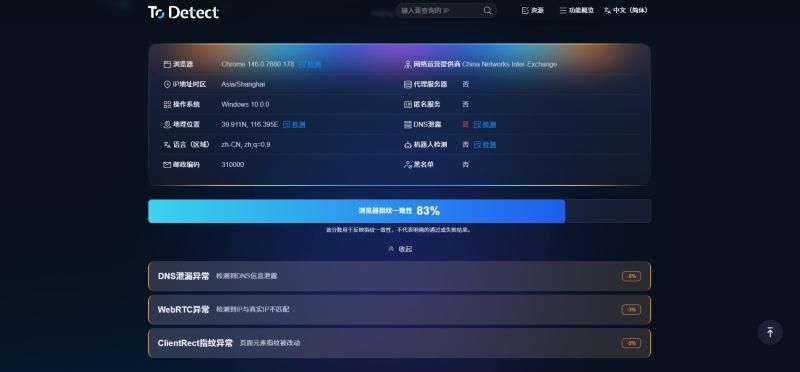
5️⃣ Use IP reputation checking platforms
There are many platforms that can check IPs for:
• Anonymity
• Risk level
• Whether it is a proxy IP
If the results show:
• High risk
• Flagged by multiple sites
Then this proxy IP has likely been “overused.”
Reliable proxy providers (such as IPDEEP) usually maintain better IP pools and risk control strategies.
3. Whymobile proxy IPs get blocked too?
Many people have the misconception that mobile proxy IPs are permanently safe. In reality, the main reasons for blocking include:
• High access frequency
• Behavior not like a real user
• Too many concurrent connections on the same IP
• Target sites have high-level risk controls
• Proxy quality varies
Even high-quality mobile IPs like those from IPDEEP can be restricted if used improperly.
4. How to reduce the chances of a mobile proxy IP being blocked?
• Control access frequency and don’t overload requests initially
• Set reasonable request intervals and add random delays
• Simulate normal browsing behavior (load resources)
• Regularly test if IPs are blocked and replace them promptly
• Choose a stable and reliable proxy service provider
Simply put: proxy IPs are just tools; proper usage is the key.
Conclusion
As long as you master the correct methods to test mobile proxy IPs and combine them with reliable proxy resources, you can keep problems within a predictable range.
If you are using proxy IPs long-term, it is recommended to establish your own IP block detection mechanism instead of waiting for issues to arise before troubleshooting.
Proxy IPs are not omnipotent. Even the best resources or reputable providers like IPDEEP can be flagged if used improperly.