






Philippines Static Residential IP Price: Where to Buy in 2026?



Clean IP picks: Static IPs from $1.5 each, Dynamic IPs from $0.5/GB


Compared with popular locations such as the US and Japan, fewer proxy providers offer long-term fixed ISP IPs in the Philippines. Some platforms list the Philippines as a supported location, but the actual number of available static IPs may be limited.
Static residential IPs remain fixed during the subscription period, making them suitable for TikTok Philippines shops, Shopee and Lazada stores, social media account management, SERP data collection, and other use cases that require a stable local Philippine network environment.
So, how much do static residential IPs in the Philippines cost in 2026? Which providers offer static residential IPs in the Philippines?
This guide covers current pricing, the factors that affect costs, and what to consider before buying.

How Much Do Static Residential IPs in the Philippines Cost in 2026?
In 2026, static residential IPs in the Philippines typically cost around $5–$20/IP/month. The exact price depends on the IP source, dedicated or shared access, ISP, bandwidth, and subscription period.
Static residential IP supply in the Philippines is relatively limited. Some providers list the Philippines as a supported location, but actual availability and the number of IPs available for purchase may vary.
Unlike dynamic residential IPs, which are usually billed by traffic usage, static residential IPs are generally billed per IP and subscription period. They are better suited to businesses that need a fixed Philippine network exit for an extended period.
Philippines Proxy IP Prices from Different Providers
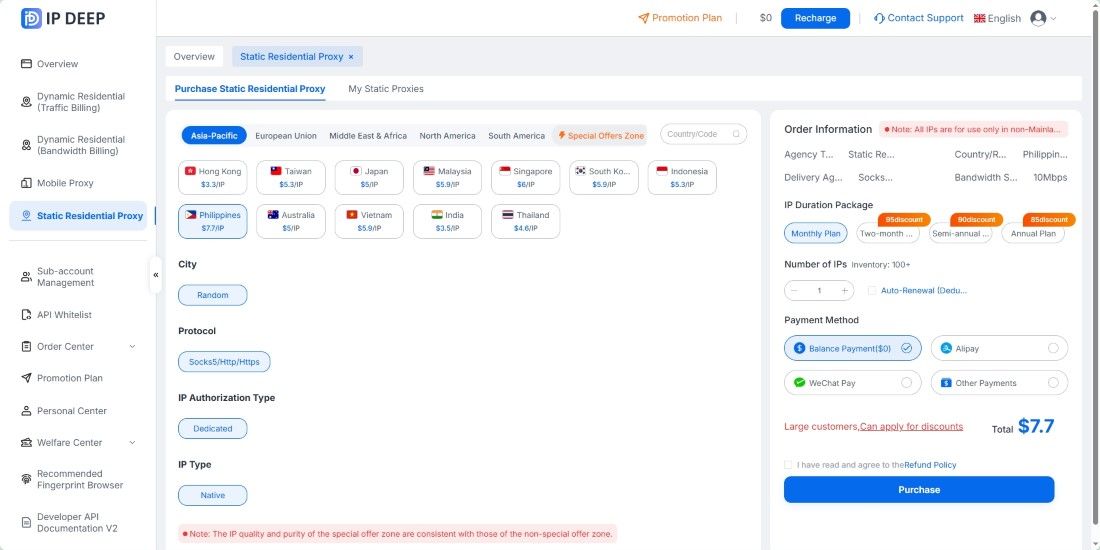
1. IPDeep: Static residential IPs in the Philippines currently cost around $7.7/IP/month, with 10 Mbps bandwidth, long-term fixed IPs, and support for HTTP/HTTPS/SOCKS5 connections;
2. IPFLY: Public pricing starts at around $5–$20/IP/month, with the actual price varying by subscription period and purchase volume;
3. StradaProxy: Offers dedicated static residential IPs in the Philippines, with 30-day plans priced at around $9.10/IP and unlimited traffic.
Factors That Affect Philippines Static Residential IP Prices
1. Dedicated or Shared
Dedicated IPs are assigned to a single user, making their reputation more controllable and generally resulting in a higher price. Shared IPs cost less, but multiple users share the same exit IP, which can affect the network reputation.
2. ISP Network
High-quality static residential IPs are typically assigned to major fixed-line ISPs in the Philippines, such as PLDT, Globe Telecom, and Converge ICT. Genuine ISP resources generally cost more to source than IPs hosted in data centers.
3. Bandwidth and Traffic Rules
Traffic-based plans are suitable for light tasks. For long-running sessions, streaming, and similar workloads, monthly plans with fixed bandwidth and unlimited traffic may offer better value.
4. Subscription Period
Monthly plans usually have a higher per-IP cost, while quarterly or annual subscriptions often come with discounts.
How to Choose a Static Residential IP in the Philippines?
1. Choose Dedicated IPs
Using a dedicated IP can reduce network overlap caused by multiple accounts sharing the same exit IP. Dedicated IPs are generally preferable for long-term operations.
However, an IP is only one part of the account environment, and a dedicated IP alone cannot guarantee that accounts will not be linked or restricted.
2. Check the ISP and ASN
Before purchasing, make sure the IP belongs to a local Philippine broadband provider rather than a data center ASN.
3. Check the Fixed Period and Protocols
Check how long the IP remains fixed and whether HTTP/HTTPS/SOCKS5 protocols are supported.
4. Match the IP to Your Use Case
Store operations and social media account management → Static residential IPs;
Data collection and bulk access → Dynamic residential IPs.
How to Check a Philippines Static Residential IP After Purchase?
After purchasing an IP, you can use IP databases such as IPinfo and MaxMind to check the IP's country, city, ASN, and ISP information and confirm that it matches the expected Philippine location, such as an ASN belonging to PLDT or Globe.
To further verify proxy connectivity, you can also use tools such as curl to test the proxy exit.
Frequently Asked Questions
Q1: What is the difference between static and dynamic residential IPs in the Philippines?
Static residential IPs remain fixed for an extended period, making them suitable for store operations and social media account management that require a stable network identity. Dynamic residential IPs rotate by request or over time and are better suited to data collection and bulk access.
Q2: Why do Philippines static residential IPs have different prices?
Price differences mainly come from the IP source, dedicated or shared access, ISP, bandwidth, and subscription period. Dedicated IPs with genuine ISP network attribution are usually more expensive.
Q3: Are purchased static residential IPs permanent?
No. A static IP remains dedicated and fixed for the duration of the subscription. It can usually be retained by renewing the subscription, while the IP will be released when the subscription expires and is not renewed.
Q4: How can I check whether a Philippines IP is genuine?
Use tools such as IPinfo and MaxMind to check the ASN and confirm that it belongs to a local Philippine ISP such as PLDT or Globe rather than a data center ASN. Also verify the country and city location.
If you are looking to buy a static residential IP in the Philippines, you can first check IPDeep for current Philippine node pricing, availability, and supported protocols, then choose a configuration based on your specific needs. For more nodes and plans, visit the IPDeep website.



