

How to Choose a Static Residential Proxy for Miravia Sellers



Clean IP picks: Static IPs from $1.5 each, Dynamic IPs from $0.5/GB


As Alibaba-owned e-commerce platform Miravia continues to grow in Spain, more cross-border sellers are exploring it as a sales channel.
Daily operations often involve managing multiple stores, coordinating teams, and accessing seller accounts from different locations. All of these activities require a stable network connection.
When team members frequently log in from different locations or multiple stores share the same network exit, managing login environments can become more complicated.
For sellers who need to manage their stores over the long term, maintaining stable IP addresses and organizing account access environments are important parts of daily operations.
Static residential proxies provide fixed residential IP addresses. This guide explains how they can support Miravia store management, what to look for when choosing a provider, and how to combine them with an antidetect browser for a more consistent operating environment.
Why Do Miravia Sellers Need a Stable Login Environment?
1. Managing Network Environments Across Multiple Stores
Sellers managing multiple stores or working with employees who handle orders, product listings, and customer messages need to organize account permissions and login environments properly.
Miravia's seller terms also require sellers to manage access permissions for authorized personnel.
When multiple stores share the same exit IP over an extended period, troubleshooting login issues and managing network environments can become more complicated.
Assigning a separate network exit to each store helps keep account access environments organized.
2. IP Changes Caused by Remote Team Access
When team members work from different cities and access the seller dashboard through their local networks, their exit IP addresses may change depending on their location.
For stores that need a consistent access environment, these changes may lead to additional verification steps or operational inconvenience.
Using a centralized, fixed network exit can reduce inconsistencies caused by frequent IP changes.
However, if Miravia requires identity verification, sellers must still follow the platform's official verification process. A static IP does not eliminate verification requirements.
3. When to Use Datacenter IPs vs. Dynamic Residential IPs
▸ Datacenter IPs: These IPs primarily come from datacenters or cloud service networks and have different network characteristics from typical home broadband connections. For store management tasks that require a consistent network identity over time, sellers may prefer static residential IPs that match their target market.
▸ Dynamic Residential IPs: These IP addresses rotate according to the provider's settings. They are better suited to tasks such as large-scale data collection and price monitoring, where frequent IP changes are useful.
They are generally less suitable for managing seller dashboards that require persistent sessions and a consistent network identity. Learn more about their rotation mechanisms in our guide to dynamic residential proxies.
How Can Static Residential IPs Help Miravia Sellers Manage Their Stores?
1. Assigning Separate Network Exits to Different Stores
Assigning a separate static residential IP to each store can reduce the number of accounts sharing the same exit IP, giving each store a relatively independent and stable network access environment.
Combined with separate browser profiles and account access controls, this approach can help reduce management risks caused by mixing network environments.
Keep in mind that separate IPs cannot eliminate all account association risks or replace compliance with Miravia's account management policies.
2. Maintaining a Fixed IP to Reduce Network Changes
A static residential IP remains unchanged throughout its rental period, making it suitable for routine tasks such as accessing the seller dashboard, processing orders, and responding to customer messages.
Compared with frequently changing IP addresses, a fixed IP makes it easier to maintain a consistent network access environment and reduces the management overhead associated with switching networks.
3. Managing Multiple Stores with an Antidetect Browser
Combining static residential IPs with an antidetect browser allows sellers to configure separate browser environments and proxy IPs for individual stores. A typical setup looks like this:
Each store uses its assigned fixed IP, while cookies and browser data are stored separately. Team members access the corresponding browser profiles according to their permissions. Avoid switching proxy nodes unnecessarily or mixing login environments.
How to Choose a Static Residential IP for Miravia
Sellers can use IP lookup tools to check an exit IP's type, ASN, ISP information, and geolocation to get an initial understanding of its network characteristics.
To check the browser environment, they can also test for potential DNS and WebRTC leaks.
Keep in mind that IP databases may classify the same address differently. An ASN registered to a telecommunications provider alone does not prove that an IP comes from a residential broadband connection.
IPDEEP Static Residential Proxies for Miravia Store Management
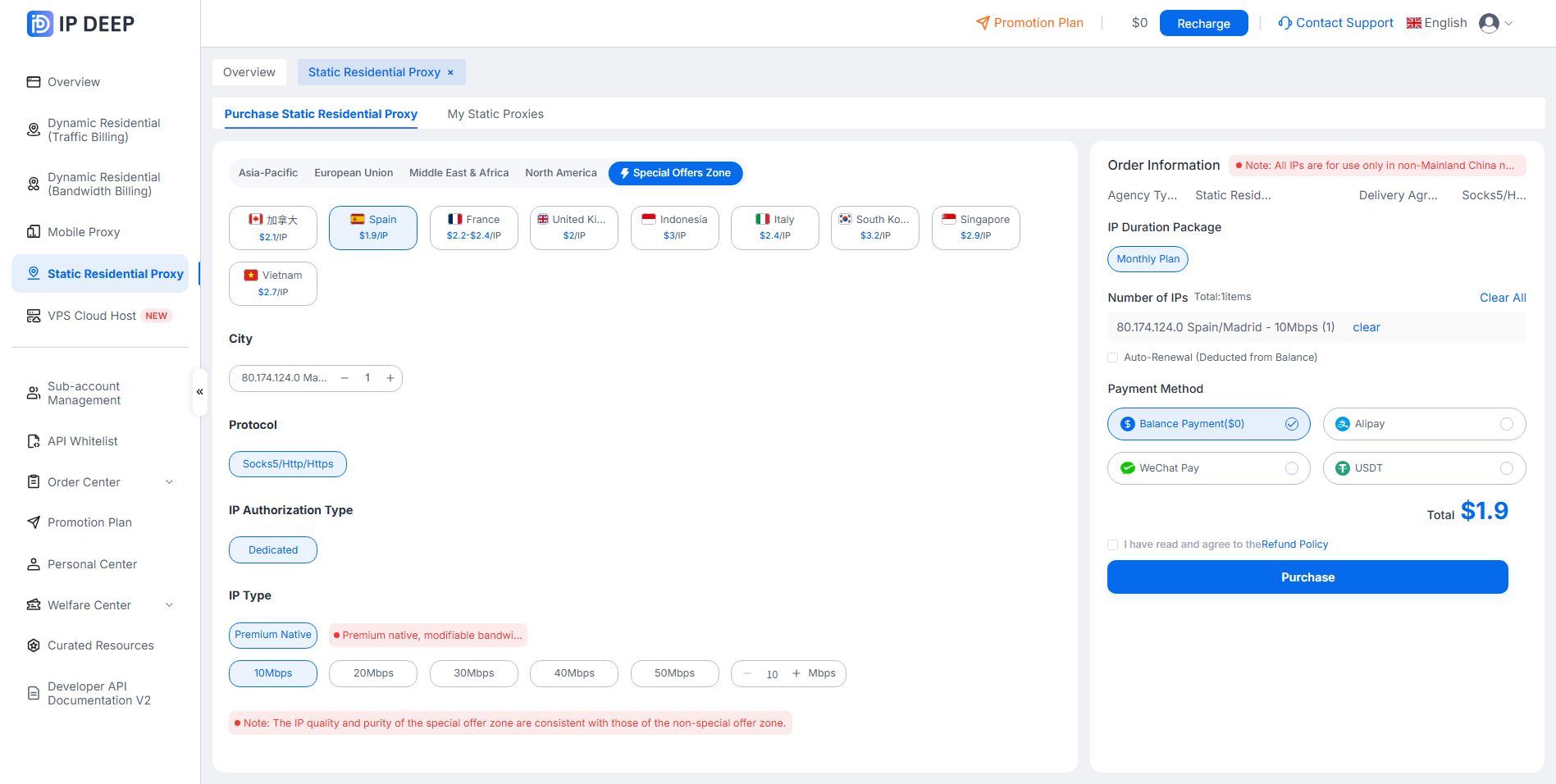
For teams managing multiple Miravia stores or working across different locations, IPDEEP offers static residential proxies with residential network exits in Spain and other European locations.
▸ Spanish IP Locations: Access static residential IPs in Spain with exit locations that match your target market, making them suitable for stores serving local Spanish customers.
▸ Dedicated Static IPs: Get dedicated static residential IPs that remain unchanged throughout the rental period. This reduces the need to share exit IPs with other users and helps maintain a consistent network environment.
▸ Customizable Bandwidth: Choose bandwidth based on your needs, with speeds of up to 50 Mbps. Available options depend on the selected plan.
▸ Multiple Protocols and Team Management: Supports HTTP, HTTPS, and SOCKS5, along with sub-account management and IP allocation features that make it easier to assign access permissions to team members.
IPDEEP also offers a static residential IP deals section, with lower starting prices available in selected locations, including Spain. Check the product page for current locations, bandwidth options, and plans.
Frequently Asked Questions
Q1: Can One Static Residential IP Be Used to Log In to Multiple Miravia Stores?
Technically, yes. However, using the same exit IP for multiple stores over an extended period is not recommended. Assigning separate network exits and browser profiles to different stores makes account environments easier to manage.
Q2: How Can You Check Whether a Spanish Static Residential IP Is Genuine?
Use an IP lookup tool to check the IP type, ASN, ISP information, and geolocation. The results should be consistent with Spain. Since different databases may classify IPs differently, cross-check the results against the provider's resource information.
Q3: How Can Remote Teams Maintain a Consistent Miravia Login Environment?
Teams can use a shared antidetect browser setup, assign a fixed static residential IP to each corresponding account, and use the proxy provider's sub-account management features to distribute access permissions.
This allows team members in different locations to access stores through the same network exit.
If Miravia requires identity verification, team members must still complete the official verification process.