How to Use an Italian Static Residential IP: Complete Guide



Clean IP picks: Static IPs from $1.5 each, Dynamic IPs from $0.5/GB


In cross-border e-commerce, social media management, and localized SEO monitoring, a stable network environment can help reduce verification issues caused by frequent IP changes.
This article introduces the key features and use cases of Italian Static Residential IPs, along with a complete guide to purchasing, configuring, and testing them.

What Is an Italian Static Residential IP?
An Italian Static Residential IP is a fixed IP address assigned by a local ISP to a residential broadband connection, making it fundamentally different from a data center or hosting IP.
Residential network: Typically associated with a local ISP, it more closely resembles a residential broadband connection in terms of network attributes and geolocation than a typical data center IP. However, the exact IP type should still be verified with IP detection tools.
Stable IP: The IP address remains relatively consistent throughout the service period, making it suitable for use cases that require a stable network environment over time.
Compared with dynamic residential IPs, static IPs are better suited to scenarios that require a consistent outbound IP. However, IP type is not the only factor that affects platform risk controls, which may also consider device fingerprints, login behavior, and other signals.
Key Use Cases
1. Cross-Border E-Commerce Store Management
When managing Italian stores on platforms such as Amazon and eBay, using an independent and stable network connection for each business environment can reduce network overlap caused by multiple accounts sharing the same IP.
Account associations ultimately depend on platform policies, device information, registration details, and other factors, so a proxy IP alone cannot prevent account associations.
2. Social Media Account Management
Platforms such as TikTok, Instagram, and Facebook closely monitor login environments.
A static residential IP provides a relatively stable network connection, helping maintain a consistent login environment and reduce verification issues caused by frequent changes in location.
3. Local SEO Monitoring and Ad Verification
With an Italian IP, you can monitor localized search results on Google.it in cities such as Milan and Rome, verify ad displays, and collect competitor pricing and inventory data.
Purchase Criteria and Process
When choosing an Italian static residential IP, consider the following four factors:
IP reputation: Choose dedicated resources where possible to avoid IPs with a history of abuse from shared usage.
Geolocation accuracy: If you need localized search results, prioritize providers that support city-level targeting.
Protocol compatibility: Choose HTTP, HTTPS, or SOCKS5 based on your specific use case.
Bandwidth: Ensure sufficient bandwidth for a stable connection during peak usage.
IPDeep offers Italian static residential IPs in locations including Milan, starting at $2.4/IP/month, with bandwidth options from 10 to 50 Mbps. Here's how to purchase one:
1. Create an Account
Visit the IPDeep website and create an account, then complete any required verification.
2. Select a Plan and Purchase
After entering the client, select 「Static Residential Proxy ①」→「Special Offers ②」→「Italy ③」, then choose the number of IPs and bandwidth ④, ⑤ based on your needs.
After confirming the plan, you can enable auto-renewal ⑥ if needed, select your preferred payment method ⑦, check 「I have read and agree to the relevant terms」⑧, and click 「Purchase」⑨ to complete the purchase.
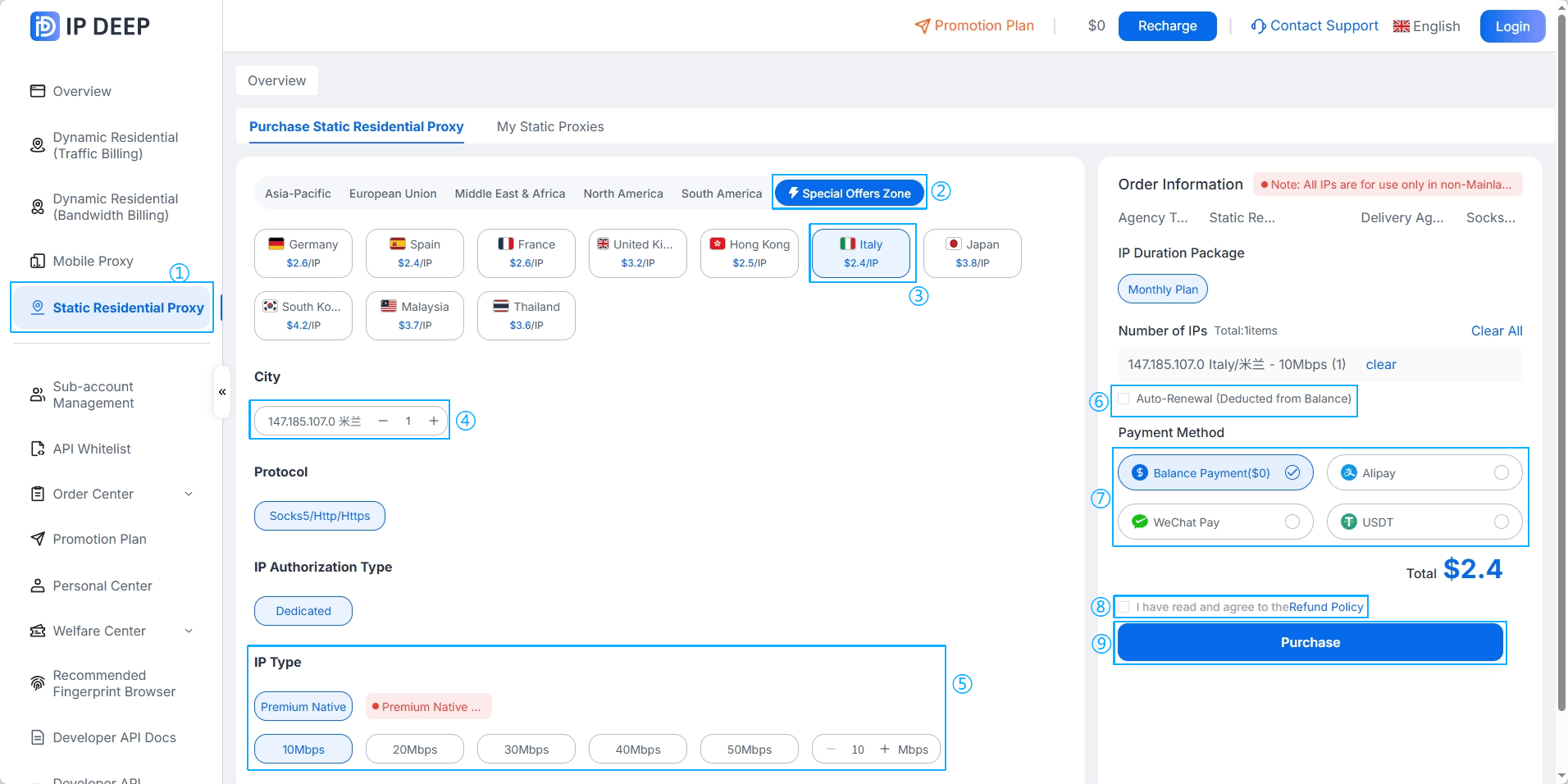
*Actual availability and pricing are subject to the IPDeep client.
Configuration Guide
After purchasing an Italian static residential IP, the provider will typically provide a proxy server address, port, and authentication credentials. Depending on your use case, the proxy can be configured in a browser environment or application.
Scenario A: Browser Environment
If you use a browser environment tool, enter the server address, port, and authentication details provided by the proxy provider in the relevant proxy settings, then select HTTP, HTTPS, or SOCKS5 based on the supported protocol.
Once configured, use the tool's built-in proxy test to verify the connection and IP geolocation.
For long-term use, you can also check WebRTC and DNS settings to prevent unnecessary network information leaks.
Scenario B: Python Integration
If you need to use an Italian static residential IP in a Python application, you can configure the proxy through HTTP clients such as Requests.
For an HTTP/HTTPS proxy, the main parameters include the proxy address, port, and authentication credentials:
import requests
proxy_url = "http://username:password@proxy_address:port"
proxies = {
"http": proxy_url,
"https": proxy_url,
}
response = requests.get(
"https://ipinfo.io/json",
proxies=proxies,
timeout=10
)
print(response.text)
If you use the SOCKS5 protocol, adjust the configuration according to the format provided by your proxy provider.
Environment Checks and Tips
Check IP geolocation: Open the configured browser and use an IP detection tool to confirm that the IP is located in Italy and that your local network information is not exposed.
Time zone and language: If your business targets users in Italy, check whether the browser language and time zone are consistent with the IP location. Avoid making unnecessary or extensive changes to system settings; consistency is more important.
Keep the network stable: Avoid frequently switching between IPs from different countries or regions within a short period. For the same business environment, keep a stable outbound IP whenever possible to reduce unnecessary login verification.
Frequently Asked Questions (FAQ)
Q1: Should I choose a static or dynamic residential proxy?
Static IPs remain relatively stable throughout the service period and are suitable for long-term store management and daily account operations. Dynamic IPs rotate at set intervals or between requests, making them more suitable for high-volume data collection and price monitoring.
Q2: Why was my account blocked even after using a static residential IP?
An IP only addresses the network layer. Platforms may also evaluate device fingerprints, login behavior, account history, and other factors. A proxy should therefore be used together with appropriate device and behavioral isolation where applicable.
Q3: How can I verify whether an IP is truly residential?
You can use third-party tools such as MaxMind, IPQualityScore, or Spur to check the IP.
If multiple tools identify the IP as ISP or Residential and show no obvious Hosting or Proxy classification, it generally indicates residential network characteristics. However, third-party databases are not always accurate, so it is best to evaluate multiple results together.
Q4: Can one IP be used by multiple accounts?
Long-term use of the same IP by multiple accounts may increase the likelihood of network-level associations, especially when the accounts share the same platform, device, or registration information.
Whether accounts are associated ultimately depends on the platform's risk-control policies. For better network separation, consider using an independent network connection for each business environment.