How to Buy ISP Static Residential Proxy IPs? Guide & Tips



Clean IP picks: Static IPs from $1.5 each, Dynamic IPs from $0.5/GB


An ISP static residential proxy IP is, simply put, a proxy IP that belongs to a residential ISP and stays fixed without rotating.
Compared with datacenter IPs, it is closer to a real user network environment; compared with rotating residential IPs, it does not change IPs frequently, making it suitable for scenarios that require a long-term fixed network exit.
This article covers four key areas: what it is, what to look for before buying, how the purchase process works, and how to configure it after purchase.

What Is an ISP Static Residential Proxy IP?
ISP static residential proxies refer to IP resources assigned or registered under residential ISPs, delivered through datacenter infrastructure for stable proxy connections.
The key points are ISP attribution and a fixed exit, rather than relying on home devices being online.
One distinction to note: it differs from P2P residential proxies.
P2P residential proxies rely on real home devices being online to provide the exit, whereas the core value of ISP static residential proxies lies in "IP attributed to a residential ISP + long-term fixed exit," offering more stable connections.
In some business scenarios, ISP static residential proxies typically offer attributes closer to a real user network environment than ordinary datacenter proxies, and are often used for scenarios requiring a long-term fixed network exit, such as account login, ad verification, and market research.
What to Look For Before Buying
1. IP Type and Cleanliness
Pay attention to the IP's ASN, ISP attribution, and network type classification. Prioritize IPs with a clean reputation history that have not been flagged as datacenter or proxy IPs.
2. Country and City Coverage
Choose nodes based on your target regions. Some businesses require city-level or specific ASN precision, so confirm before purchasing whether the provider can meet those needs.
3. Dedicated vs. Shared
A dedicated IP is exclusively used by a single user, so its network reputation is unaffected by others; shared IPs cost less, but the same IP may be used by multiple people. For long-term account operations, dedicated is recommended.
4. Protocols and Bandwidth
Confirm whether HTTP, HTTPS, and SOCKS5 are supported, and whether the bandwidth specifications meet your business needs.
ISP Static Residential Proxy IP Purchase Process
Step 1: Define Your Needs
First, clarify two things — whether to buy by IP or by traffic, and how many you need.
ISP static residential proxies are typically billed by the number of fixed IPs and subscription period, while rotating residential proxies are more often billed by traffic consumption.
If you just need fixed login for a single account, 1 IP is enough; for multi-account operations, it is recommended to use a separate IP for each account.
Step 2: Choose a Provider
Pay attention to provider qualifications, terms of service, refund, and replacement policies. It is advisable to start with a small purchase or trial to confirm latency and availability before buying in bulk.
Step 3: Choose a Plan
In the provider's dashboard, select the target country/region, protocol (HTTP/SOCKS5), number of IPs, and subscription period (monthly/yearly).
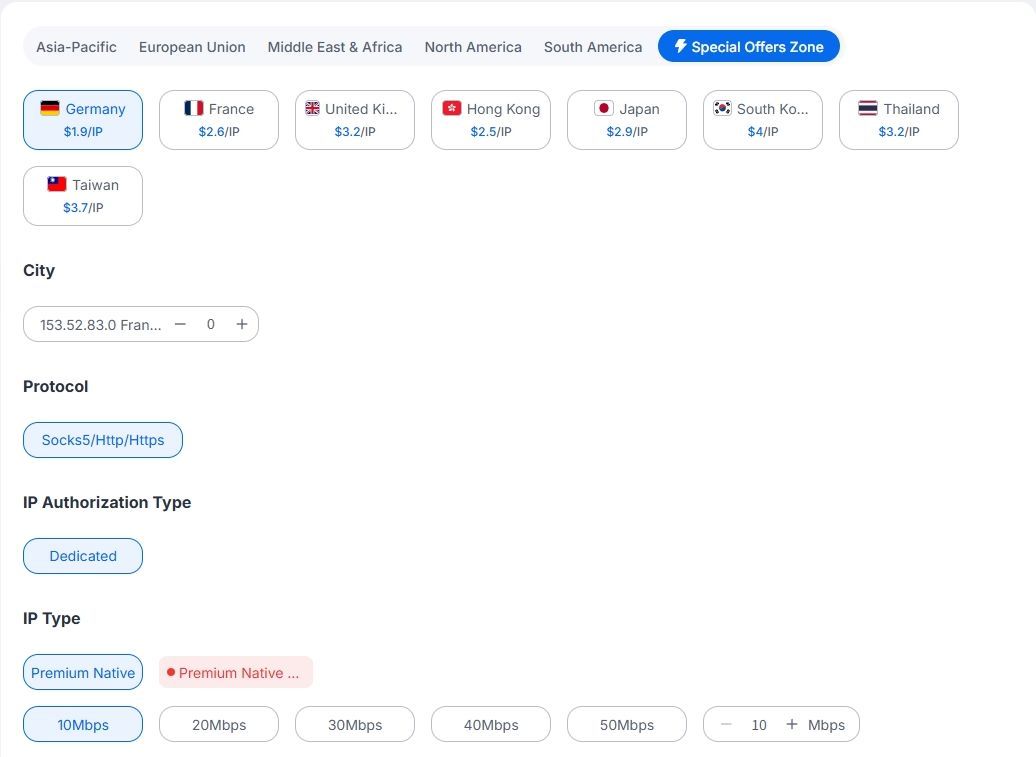
Step 4: Get Proxy Credentials
After payment is complete, the dashboard will assign a fixed IP, port, username, and password (or provide API whitelist extraction).
How to Configure After Purchase
Browser Environment
Multi-account management is usually used in combination with an antidetect browser.
Software Tools
Other clients or script tools can be configured in the same way; the key is that the protocol type (HTTP or SOCKS5) matches what the provider offers.
If you want to verify the actual attributes of an IP after receiving it, you can use an IP detection tool to check:
▸ Country / City location
▸ ASN attribution
▸ ISP information
▸ Whether it is flagged as a datacenter IP
FAQ
Q1: What is the difference between ISP static residential proxies and rotating residential proxies?
Static ISP proxies provide a long-term fixed IP with stable connections, suitable for account login, store operations, and other scenarios that require a fixed network identity;
rotating residential proxies change IPs per request or time interval, suitable for large-scale public data scraping, multi-region ad verification, and similar tasks.
Q2: Why are static residential proxies generally more expensive than datacenter proxies?
The resource attribution and procurement costs of static residential IPs differ from datacenter IPs, and they occupy a long-term fixed exit, so the price is usually higher.
Q3: How often are static residential IPs replaced?
They remain fixed during the subscription period and are generally not proactively replaced; however, IPs may change when the service expires, a node goes offline, or the provider adjusts resources. Refer to the provider's terms for specifics.
Q4: How do I confirm an IP has residential attributes after purchase?
You can use an IP detection tool to check whether the ASN attribution is a telecom operator and whether the network type classification is residential/ISP rather than Hosting or Datacenter.
Q5: The proxy won't connect or has slowed down. How do I troubleshoot?
First confirm local network connectivity; then check whether the IP, port, username/password spelling, and protocol type match; finally, check the provider's node status or contact technical support.
If you want to purchase ISP static residential proxies directly, you can visit IPDeep to view nodes and plans.
IPDeep offers static residential IPs in multiple countries and regions, with options by region, protocol, and subscription period. Some nodes start as low as $1.9/month; refer to the official website for real-time pricing.
For more plans and node information, visit the IPDeep official website.