Proxy IP Beginner's Guide: What Is a Browser Proxy?



Clean IP picks: Static IPs from $1.5 each, Dynamic IPs from $0.5/GB


When accessing overseas websites, managing multiple accounts, or conducting data collection, have you ever encountered issues such as access restrictions, account abnormalities, or IP bans? Many beginners first try switching browsers, clearing cache, or even reinstalling the system repeatedly—but the problem still persists. In fact, the real key often lies in this: your IP has exposed your real identity.
This is exactly why browser proxies exist.
From a beginner’s perspective, this article will help you fully understand what a browser proxy is, what problems it can solve, who it is suitable for, and how to correctly choose a proxy IP.
What Is a Browser Proxy?
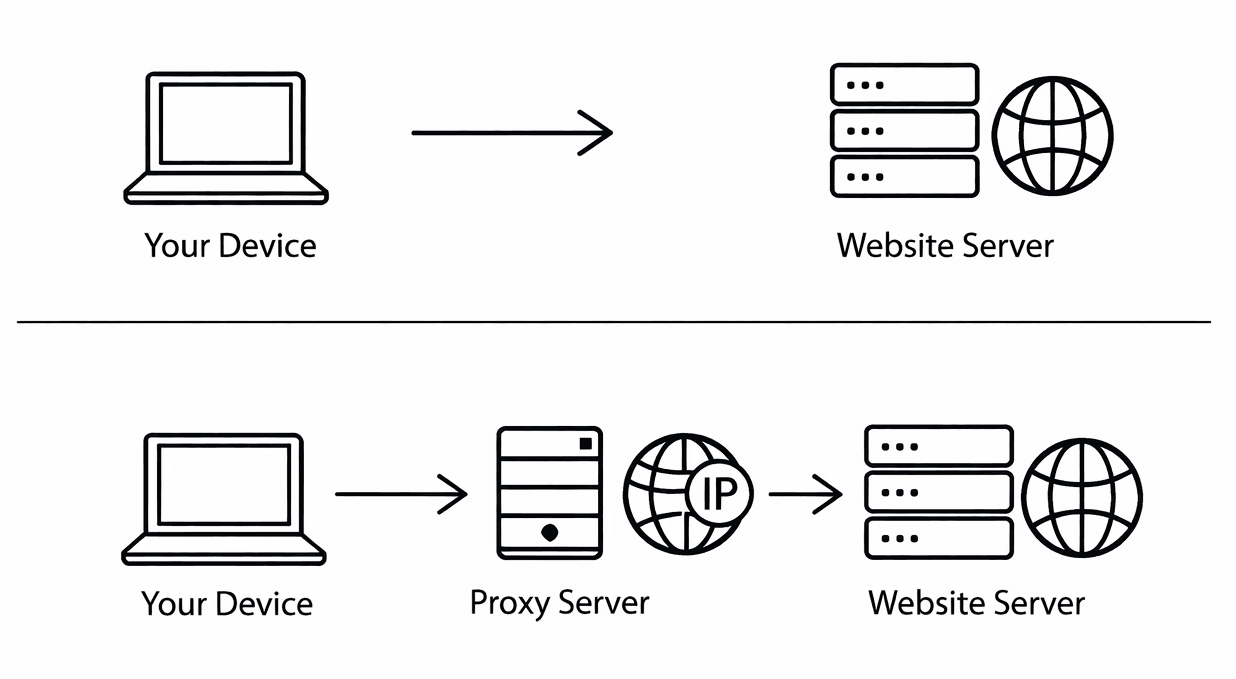
A browser proxy refers to configuring a proxy server at the browser level proxy server so that network requests sent by the browser first pass through a proxy IP before reaching the target website.
After enabling a browser proxy, the browser’s access path changes:
Requests are no longer sent directly from the local device to the website, but are first sent to the proxy server, which then forwards them to the target site.
During this process, the target website sees the proxy server’s IP address instead of your real IP.
As a result, it can hide your real identity, switch access endpoints, and bypass certain access restrictions.
The core purpose of a browser proxy is simple: use a proxy IP to replace your real IP.
Why Use a Browser Proxy?
1. Bypass Regional Access Restrictions
Many overseas websites, tools, or services restrict access based on the user’s IP location. By switching to proxy IPs from different countries or regions, you can access this content normally.
2. Protect Your Real IP and Privacy
Once a real IP is recorded by a website or platform, user activity may be continuously tracked—for example, for ad targeting or risk control—and in some cases may even become a target of malicious attacks. Using a proxy in the browser can help hide your real IP and reduce the risk of being directly identified and linked, making browser proxies a basic form of privacy protection.
3. Multi-Account Operations and Anti-Linking
This is one of the most important commercial uses of browser proxies. In social media operations, cross-border e-commerce, and advertising, if multiple accounts share the same IP, platforms can easily identify them as related and trigger risk control mechanisms.
4. Data Collection and Automation
During web scraping, price monitoring, or information collection, frequent requests can easily lead to IP bans. Rotating access through proxy IPs can significantly improve stability and success rates.
What Are the Common Types of Browser Proxies?
1. Local Browser Proxy
○ Directly configured in Chrome / Firefox / Edge
○ Or set via extensions or fingerprint browsers
○ Full control over IP, port, and protocol
Features: Standard and highly stable
Best for: Account operations and long-term business
2. Web Proxy
○ Accessed via third-party proxy websites
○ No configuration required
Features: Instant use, but higher risk
Best for: Temporary access or emergency viewing
3. Browser Extension Proxy
○ Switch proxies via browser extensions
○ Essentially a form of local proxy
Features: Easy to operate
Risks: Extension permissions and logging issues
How to Use Browser Proxies Correctly?
In short, there are 3 key points:
1. Configure the proxy for browser use only
It is not recommended to enable a global proxy. Using the proxy only in the browser prevents other software and system services from routing through it, reducing the risk of abnormal traffic.
2. One account, one fixed IP
Try to keep the IP stable for the same account and avoid frequent changes. Multiple accounts should use different proxy IPs to prevent being flagged as related.
3. Combine with a fingerprint browser
When managing multiple accounts, using a fingerprint browser helps keep each account’s browser environment isolated, improving overall stability.
Also avoid the following common mistakes:
1. Using free proxies directly
Free proxies usually have poor stability and security, and their IPs are often reused by many users, posing higher risks.
2. Multiple accounts sharing the same proxy IP
This makes it easy for platforms to identify them as the same user and is a common cause of account linking and anomalies.
3. Frequently switching IP countries or regions
Frequently changing IP locations in a short time can be flagged as abnormal behavior. It is recommended to keep the region relatively consistent.
Final Thoughts
When your business involves account management, regional differentiation, access frequency, or operational scale, whether you use proxy IPs can directly impact overall stability and account lifespan. If you are still debating whether proxies are necessary, it may indicate that your setup has not yet reached common industry standards. Only by choosing the right type of proxy and using it correctly can you fundamentally reduce these issues.
IPDeep provides high-quality proxy IPs, including:
With over 10 million high-quality IP resources covering 200+ countries and regions worldwide, IPDeep provides stable and reliable support whether you need to bypass geo-restrictions, ensure data collection, or improve access speed and security.