






Telegram Verification Code Not Received? Causes & Fixes



Clean IP picks: Static IPs from $1.5 each, Dynamic IPs from $0.5/GB


Not receiving a verification code when registering for or logging into Telegram is a common issue, especially for users with +86 phone numbers.
A missing verification code does not necessarily mean Telegram is down. In many cases, the code may have been sent somewhere else, or the issue may be related to SMS Fee, the phone number, or the network environment.
Below, we’ll go through the common causes and solutions step by step.
Why Is Telegram Not Sending a Verification Code?
1. The code was sent to another logged-in device: If you recently logged in on another device, such as a computer, tablet, web browser, or another Telegram client on the same device, Telegram may send the code through an in-app message instead of SMS. This is one of the easiest things to overlook.
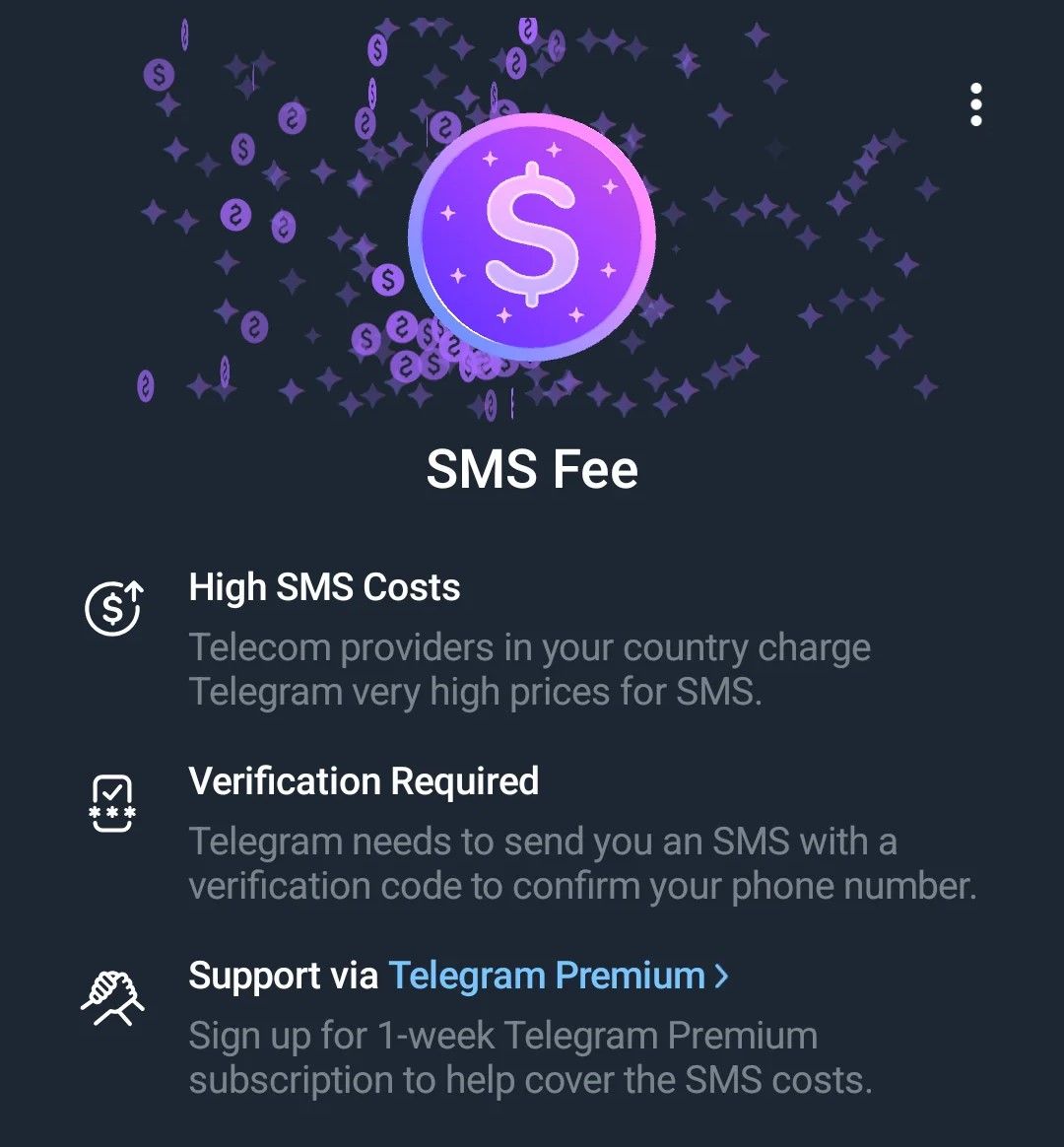
2. You triggered an SMS Fee: Telegram officially states that users in certain countries or on certain mobile networks may be asked to purchase Telegram Premium when SMS verification costs are high. In this case, you may need to complete the payment before continuing the verification process.
3. Phone number or SMS delivery issues: In some countries, receiving SMS from overseas services may be affected by carrier messaging systems, international SMS routing, or spam filters. The exact cause depends on the phone number, carrier, and SMS delivery route.
4. Unstable network connection or proxy: Telegram requires a stable network connection during login. Frequent proxy disconnections, switching between regions, high latency, or packet loss may prevent the verification request from completing properly.
5. Too many verification requests: Repeatedly tapping “Resend code” within a short period can trigger Telegram’s request limits and result in messages such as “Too many attempts.” Repeated attempts may extend the waiting period.
6. Client version issues: Using an outdated client or an unofficial modified version may prevent the login verification process from working properly.
How to Fix Telegram Verification Code Issues?
Method 1: Check Other Logged-In Devices
Open Telegram Desktop, Telegram on your tablet, or Telegram Web (web.telegram.org), and look for the official verified chat named “Telegram.” The verification code may appear there as a system message.
This should be the first thing you check.
Method 2: Check Your Phone Number and SMS Settings
Make sure the country code and phone number are correct. Check your phone’s SMS or security settings for spam filters and blocked numbers, and make sure messages from overseas numbers are not being blocked.
Also, make sure your SIM card is active and check whether your carrier has any restrictions on receiving international SMS.
Method 3: Pay the SMS Fee if Prompted
If the login or registration page clearly shows an SMS Fee, it means the current verification process requires you to cover the SMS verification cost.
Telegram’s official paid verification process is generally completed by purchasing Telegram Premium. The exact price and payment method depend on what is shown in the Telegram app and may vary by country, region, and currency.
If you plan to use the account long term, completing the payment through the official Telegram app may be more practical than repeatedly changing phone numbers or clients. Use the official payment process and avoid third-party “payment” or “verification code” services.
Method 4: Try Email or Voice Verification
Some accounts may be eligible for email-based login verification. If Telegram provides an email verification option, follow the instructions shown on screen.
If the option is not available, you cannot force Telegram to use email instead of SMS.
For voice verification, Telegram officially states that voice-delivered verification codes are only available for accounts with two-step verification enabled, so not everyone will see the “Call me instead” option.
Method 5: Switch to a Stable Network and IP
If your proxy connection is unstable or frequently switches regions, try a more stable connection and avoid changing your IP or country while requesting the verification code.
For users who need to manage Telegram accounts over the long term, a fixed static residential IP can provide a more consistent network exit and reduce frequent changes in the network environment.
Method 6: Try Telegram X or an Older Client Version
Telegram X is an experimental Android client officially provided by Telegram. Its login process may differ from that of the main Telegram app in some cases.
Some users have also reported that installing an older version of Telegram can make the SMS verification option available again. However, this does not work for every account, device, or region, and Telegram may require you to update the app before you can continue logging in.
If you try an older version, get it from a trusted source and update to the latest official version after logging in.
Method 7: Wait for the Request Limit to Cool Down
If you see “Too many attempts” or a similar message, stop requesting new codes and try again after the waiting period shown on the screen.
If no specific waiting time is shown, wait for a while before trying again to avoid repeatedly triggering the limit.
What If a +86 Phone Number Does Not Receive a Telegram Verification Code?
If you are using a mainland China phone number and do not receive the code, check the following in order:
1. Check whether the code was sent to another logged-in device.
2. Check the phone number, country code, SMS filters, and any carrier restrictions on international SMS.
3. If an SMS Fee prompt appears, follow the payment instructions or try another phone number.
4. Switch to a stable network environment and avoid frequent proxy disconnections or region changes.
5. Try Telegram X, or use voice verification if two-step verification is enabled.
Receiving overseas SMS on +86 numbers can be affected by carrier messaging systems and international SMS routing. These issues are not necessarily related to a Telegram server outage and may instead involve SMS delivery or network conditions.
Frequently Asked Questions
Q1: Where can I find a Telegram verification code sent to another device?
Open any Telegram client where you are still logged in and find the official verified chat named “Telegram.” The verification code will appear as a system message in the chat history.
Q2: What should I do if my +86 phone number never receives a Telegram verification code?
First, check your other logged-in devices, then check SMS filters and carrier restrictions on international SMS. For a new registration, you can try a stable network connection, Telegram X, or voice verification if two-step verification is enabled.
Q3: Why does Telegram ask me to pay an SMS Fee?
Telegram officially states that SMS verification can be more expensive in certain countries or on certain carriers. In these cases, the official client may require users to purchase Telegram Premium to continue registration or login. The exact price depends on what is shown in the app.
Q4: Will changing my IP help if I do not receive a Telegram verification code?
If the issue is caused by an unstable network connection, frequent proxy disconnections, or region switching, changing to a more stable network exit may help.
If the code was sent to another device, blocked by your carrier, or the account requires an SMS Fee, changing your IP will not solve the problem. First identify where the verification process is failing, then decide whether you need to change your network.
Q5: What should I do if Telegram shows “Too many attempts”?
Stop requesting new codes and try again after the waiting period shown on the screen. This message indicates that the request limit has been triggered, and repeated attempts may extend the waiting time.
If you need a static residential IP for a specific country or region to maintain a stable network environment for long-term Telegram account management, you can explore IPDeep static residential IP solutions.
IPDeep supports multiple countries and regions and offers HTTP/HTTPS/SOCKS5 protocols. Check the official website for current pricing and availability.



